A pet peeve of mine in Things is the inability to have sub-areas. In my eyes, you’re forced into categorizing your tasks into one of two ways – neither of which work all that great:
- Option 1: Areas for all the things!
Pro: You’re actually using areas and projects as Culture Code intended
Con: In order to pull this off, you’ll likely have lots of areas which becomes overwhelming to look at, especially on iOS. - Option 2: Areas for higher level things, and projects for sub areas.
Pro: Less visual clutter
Pro: By using projects for sub-areas, you can take advantage of project-only features like headers
Con: You’re not using the app as intended so you lose the distinction between actual projects and sub areas
While I’ve settled with Option 2 as the better option for my use cases, I’ve never been fully satisfied with my projects and sub areas being indistinguishable from one another.
Over the past several months of using Things, I’ve played around with a few characters to differentiate the two. The two that have stood out in my mind are the checkbox symbol (☑︎) and what Apple’s character palette considers a “Parenthesis Extension” (⎜). ( They actually have separate characters for both left and right extensions, but I can’t seem to find any visual difference between the two.)
I eventually settled with prefixing my sub-areas the parenthesis extension rather than prefixing each project with the checkbox. The extension seemed to introduce the least amount of visual clutter, and I find the divide also visually indents the sub-areas nicely under their main areas which helps to further the idea of it being nested under the area.
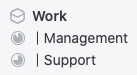
I still wish Cultured Code would just allow us to selectively disable the “progress pies” for sub-areas, but until then, this is a nice way of quickly distinguishing sub-areas from projects.
 According to Andrea
Thanks for another great post.!
Maybe this is a dumb question but, does a sub-area then get segmented into virtual projects using headers? Or is the content of a sub-area made up of loose tasks?
I agree that an official sub-area feature would be ideal. I wish the glacial speed at which Cultured Code adds features would speed up a bit.
Whether I use headings really depends on the sub-area. For example, my “Pets” sub-area under Home doesn’t have any special break down, but my “Chores” sub-area is broken up into headings for Daily, Weekly, Monthly, and Seasonal. Anytime I’m breaking something down with headings, it’s purely to help my brain visually rather than to create virtual projects. Projects always get their own dedicated project.
I’m trying to solve the same challenge, which brought me to your excellent blog.
The interesting thing about Headings is that they function like sub-Projects. Within each heading are Anytime, Upcoming, and Someday tasks. So a project with 3 heading could have 3 separate Anytime, Upcoming, and Someday lists all on the same “page”. Unfortunately, they’re all mashed together, so clicking the “Hide later items” button is the only way to visually distinguish them.
My best solution (wish list) would be to add “Groups”, basically a dumb folder; it’s only functions to contain and collapse/expand areas (like a folder in Wunderlist). In your example, that would look like:
Work (group)
– Management (area)
– Support (area)
— Project 1
— Project 2
— Project 3
Of course, that doesn’t exist (and probably never will). After using your system outlined here from July 2019, have you improved upon it at all?
Hi Mark,
Thanks for stopping by. Yes, I am still using this method. While I’d much rather have the option for a desperately needed third level between areas and projects, distinguishing areas in this way does work for me. It’s not ideal, but until Cultured Code reconsiders, if they ever do, I’m forced to work with what we currently have.
Best,
Andrea
Hello Andrea
Thank you for your post
I have been using Things for years but I just realized how great it would be to have sub-areas
I wonder if 3 years after you have found a better solution or still use “|” as a synthetic sub-area?
Thanks in advance, Alex
Hi Alex,
I haven’t found a better option, sadly. Every once in a while I consider folding sub-areas back into my main areas and using tags to differentiate them. It takes about 2 days before I find having to tag everything manually (even with my minimal use of tags) to be a hassle and end back up using projects for sub-areas. It’s not ideal, but it is the workaround that fits best with my workflow.
Thanks for stopping by,
-Andrea
Thank you for a swift reply [to such an old post]
Have you ever considered switching to some other productivity apps?
I found myself so excited about the idea of how to integrate sub-folders in my productivity process that I am even ready to move to some other app (like Todoist, for instance)
I’ve certainly considered switching to other apps. In fact, if you poke around on this blog, you’ll see I’ve used other apps and actual paper in the past. I still keep up with other apps in the market because I’m generally interested in the space, but the draw to actually switch to them isn’t there like it used to be. What has helped me is keeping a note on my must-have features for my system. In that note, I also include the pain points I’ve had with other apps so that I can easily see if new features might resolve them. That being said, even after using Things 3 for nearly 5 years, it still continues to check the most boxes for me. IMO, you can spend a lot of time thinking and hoping for the most optimized system, but at the end of the day, no task manager will magically get your work done. That comes down to you.
Confused. Are you merely calling “Projects” as “Sub-area” and that for visual you are adding prefix of “|”? Or are you using projects with and without the “|” prefix and when it has a prefix then it is considered to be a “Sub-area” and otherwise (without the “|”) it is considered to be a project. The fact that you cannot put projects under projects means that the concept of sub-area is not really working – all you have is Areas and Projects and you can call Projects Sub-areas if you like.
Maybe a more detailed example of Areas, sub-areas and projects will help clarify for the reader.
In the post I mentioned that I settled on using Option 2 which is using what Things considers “projects” prefixed with | as a workaround for its lack of sub-areas. If I have a sub-area that starts generating projects, that’s a sign that I need to break it out as its own area. I’ve been using this workaround for over 4 years now and it is still very much working for me, but I understand that it is a workaround and not a perfect solution for everyone.
Hopefully that clarifies my post, and thanks for stopping by.
Hello! As others have experienced, I was also trying to figure this problem out and came up with your blog post. At least it’s refreshing to see others struggle with it too XD
Seeing that it’s 2025 and Culture Code didn’t come up with an answer, I’m curious if you’re still using the “option 2” work around or if you found another app that works better for you?
Hi Andres,
I’m definitely still using Things, and also still primarily using Option 2. Although, I will occasionally promote a sub-area to its own area if I feel I need to give it more attention.
That being said, I recently had a bit of a lightbulb moment that scheduled tasks still appear in the Today view even if its parent project is marked as Someday. The result is these “sub-area projects” no longer show up in the sidebar intermingled with my actual projects. They also remain distinct from my main areas if I want to see their tasks separately rather than mixed in with an area’s one-off tasks. Last but not least, they also can have tags associated with them so I’m not forced to tag each individual task.
Hope that helps and thanks for stopping by!
-Andrea