{January Topic: Journaling} Journalling Tools

Today’s post is going to be about the tools I use to journal.

Last week, I briefly mentioned my OCD about paper journals. Don’t get me wrong, I’m a sucker for new notebooks. Put me in an office supply or stationary store and watch out. I just hate the feeling of ruining a perfect, new journal with my handwriting that seems to change by the minute. (Think I’m kidding? My handwriting changes so much, I actually got in trouble once because a teacher thought someone else was doing my homework.)

Momento (iOS, $2.99)

Given my inability to stick with paper journals, it should be no surprise I went digital, and I started that journey with Momento. The thing that drew me to Momento was that it automatically pulls my social media posts into the journal. I’ve found a few apps that do this, but none worked as well or looked as good as Momento. You can also, of course, add your own entries, and they even had a section to give a 1-5 star rating to the entry. I liked to use this to rate my days. Momento is lacking in a few areas though. First and foremost, it’s only on the iPhone. I don’t use my iPad for journaling so that wasn’t a big deal, but it’d be nice to see or add to my journal it on my Mac. Another feature it lacks was TextExpander support. (Tip: When I used Momento, I worked around this by using Launch Center Pro to add snippets into my entries.)

STEP Journal (iOS/Android, Free)

After Momento, I flirted briefly with an app called STEP Journal. Unlike what its name imply, this doesn’t track steps (it does, but it tracks more). Like Momento, it pulls in data from various social media sites, but also pulls in events from your calendar, photos on your phone, and even fitness information from Jawbone or Fitbit. Personally, I felt this app just wasn’t ready for prime time. I was spending more time making things pretty and consistent than entering anything worthwhile, and just like Momento, there was also no Text Expander support or Mac version either. It does look like they’re in the process of developing a web app though.

Day One (iOS $4.99, Mac, $9.99)

And this brings us to where I’m at now, my journal app of choice – Day One. When it comes to journaling on iOS or OSX, Day One is the top choice for most people I’ve come across. I actually ended up with both apps at some point, but because journalling was never really part of my day, I never used them. Aside from being gorgeous, Day One offers both native Text Expander support and a Mac client but it doesn’t automatically import social media posts. A few solutions have popped up including Brett Terpstra’s wonderful Slogger, but even the nerdiest side of me got overwhelmed with just reading how to set it up. Currently, I’m using Giftttdy which uses IFTTT and Dropbox to pull content in.

Next week’s post will feature what I’m actually journalling about and how I do it.
Signature Update

{January Topic: Journaling} Why I Journal

Hello lovely readers!

Some of my post popular posts on this blog are tech related so I’m going to try to focus on a topic a month taking a couple of posts to really delve into what I use in relation to that topic.

January’s topic is Journaling.

I’ve liked the idea of keeping a journal for as long as I can remember. Actually keeping one, however, has never been my strong suit. I have a bit of OCD when it comes to actually writing in brand new journals. They seem so perfect when they’re new, and once I’ve written in them, they feel ruined. In fact, if anyone ever went snooping through my closets, they’d find a whole box of unfinished journals.

Every once in a while, I go through my old journals and look at what was important to me over the years. Some of them give me quite a chuckle actually. There’s one from elementary school where I wrote about how a boy in my class told me his pant size, and I even found one where I wrote about how thankful I was to have my best friend (and she’s still my best friend to this day.) During most of my middle and high school years, journals were actually graded, and my teachers selected prompts each day. As much as I hated it then, those are some of my favorites to look back on.

Nowadays, I don’t journal about boys telling me their pant sizes, and I don’t journal because I have to. I journal because I want to learn more about myself and I want to become a better, happier person. Over the next month, I’ll be posting about what I journal about, what I use, and most importantly how I journal (including some tips and tricks along the way).

The next post will be about the tools I’ve tried and what I use today.Signature Update

One Word for 2015

One Word 2015 BannerLast year’s big thing around the new year was everyone’s “one word”. Mine happened to be “simplify“. I’d say I did an okay job. I simplified a lot of things: my make up routine, my computer, my organization systems, etc. The whole “one word” concept was something that really resonated with me, so when the new year rolled around, I knew it was something I wanted to continue.

But that begged the question, “What on earth would my word be?” I loved “simplify”, but that was last year’s word. I obviously had to pick something else.So I thought about it and came up with one I like… drumroll please…

My one word for 2015 is…

fresh

2014 definitely ended in a way that shook things up for me. If there’s one thing I learned from it all, it’s that I need a fresh start – a fresh outlook on everything whether it be relationships, my work, or where I’m going in life. There’s nothing like getting a swift kick that forces you to realize you’ve been on auto-pilot for far too long heading in a direction you don’t want to go, and that’s where I’ve found myself.

I’m also hoping to apply fresh to other areas of my life. I want to be more open to fresh ideas and not so set in my ways. Going in a completely different direction, I also want to incorporate more fresh meals into my life. Living alone for these past couple months has definitely led me down a path of prepared foods and things that come out of a box, and I’d like to change that.

So here’s what I’m focusing on big-picture-wise for 2015:

  • I’m committed to becoming debt free as soon as possible. I’m blessed to not have any student loans or a car payment, but the $40/mo I pay in interest alone on my credit cards, in addition to the payments I’m making, would be much nicer in the bank. Based on my current payment plan, I should be debt free (minus the mortgage) by summer of 2016, just in time for my 26th birthday.
  • I absolutely need to figure out where my career is going. If I choose to stick with my current path, I need to reassess how to make it work for me. If I choose another path, I need to figure out what that path is.
  • I want to grow as a person. I cannot be on autopilot anymore, and that means doing things for me and finding out about myself.

Habit-wise, I’ve got a few things on the table too:

  • Journal daily – I’ve been trying to use Day One more, starting primarily as a gratitude journal where I record 3 things I’m grateful for each night before bed.
  • Drink more water – I am pretty sure I’ve been in a perpetual state of dehdryation for about 2 weeks now, and that absolutely needs to change. I’m aiming to drink half my bodyweight in ounces each day.
  • The last is more of a collection of habits related to health including taking the recommended number of steps per day (which I fail at pretty regularly), taking breaks from sitting in front of a computer all day, etc. I jumped on the quantified self bandwagon as soon as fitness trackers came out, yet I’ve never done much with them, and I hope to change that this year.

Well there you have it folks, my one word for 2015, and what I’m focusing on this year.

Here’s to a great 2015.

Signature Update

Wrapping up 2014

Quick Blog Update: After this post, I’ll actually be taking a brief hiatus from posting here until the beginning of next year when my semi-normal posting schedule will resume.

My focus for 2014 was to “simplify”. As you might imagine from reading this blog, 2014 was anything but simple for me. It was full of twists and turns, none of which I ever expected.

Looking back at my goals post from the beginning of the year, I was a bit overzealous. Unforeseen circumstances meant reading 52 books was just not possible. According to Goodreads, I did make it to 25 though. Most of the year I was focused on putting out daily fires not proactively picking three tasks a day (and completing them), exercising regularly, drinking enough water each day, or running a 5K. I did, however, manage to knock one thing off the list. I did purchase my bedroom furniture (and a condo). I spent time with friends though not as much as I’d have liked, and I would like to believe I didn’t neglect this blog too much.

So maybe I didn’t reach all my goals I set for myself, but that doesn’t mean they turned out badly at all. I mean in the past year, I received a significant promotion at work. I completed one graduate program and started on another, and I have embarked on the experience of a lifetime buying and renovating a fixer upper, that also happens to be my first time truly living on my own. I stopped living as if there was no tomorrow and started living in order to have a great tomorrow. I feel as if I truly grew as a person, and that’s better than reading 52 books or remembering to pick 3 tasks each day.

2014 was full of ups and downs, but I’m ending the year on a high note, incredibly proud of what I’ve accomplished, and still a little shocked at it too. I still lie in bed at night and just smile looking around thinking back to when my condo was covered in wallpaper and everything was all just an idea in my head.

Happy Holidays and Happy New Year! See you in 2015!


Signature Update

What’s on My iPhone 6 (December 2014 Edition)

It’s been over a year since I posted my first “What’s on my iPhone?” post, and that means I’m due for an update.

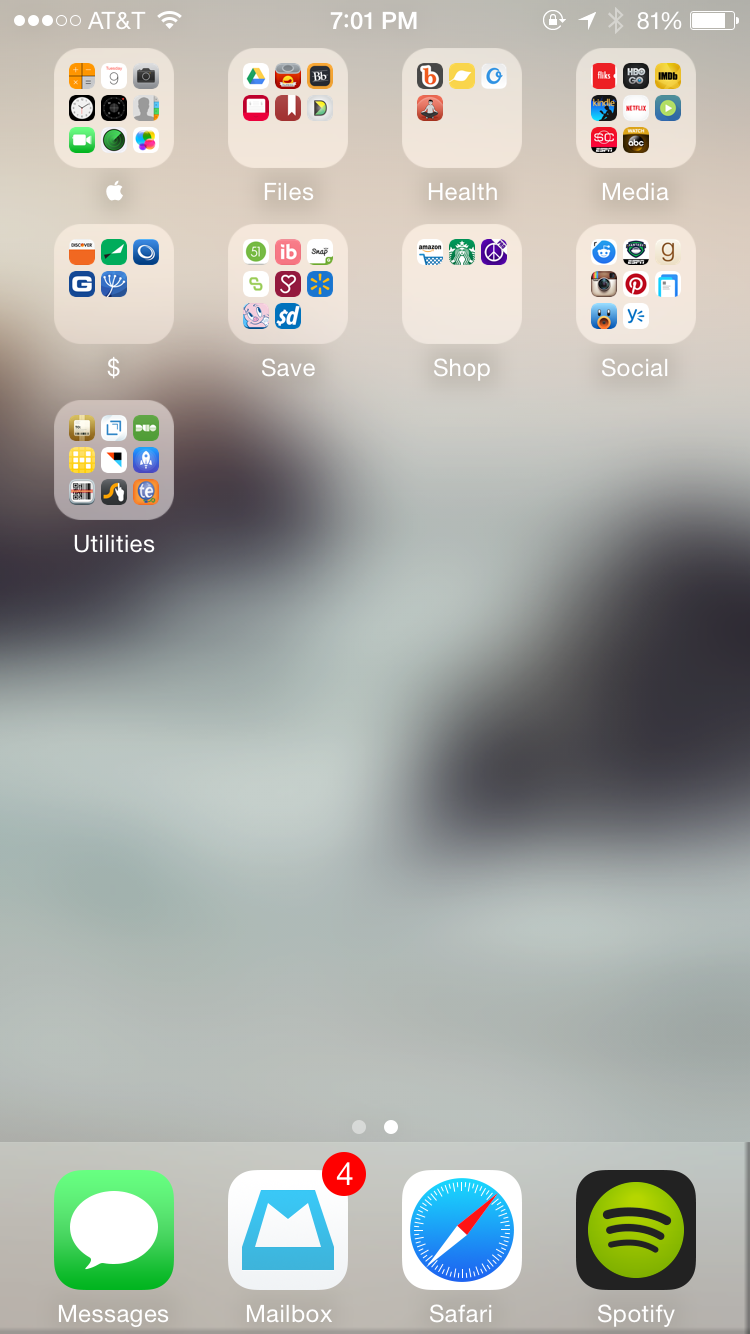
I still use the same general organization – frequently used apps on the first page with the last row empty, folders on the second. Moving to an iPhone 6 also gave me an additional row for apps on each screen.

I’m actually shocked to say that many of my “frequently used” apps from last year have lost their spots on my home screen. Calendar, Yahoo Weather, Things, and Fitbit have all been retired for other alternatives. Clock, Calculator, Camera+, and Light have all been replaced by swiping up to reveal the Control Center introduced with iOS 7. My dock however has remained the same.

Onto my new (and improved) home screen.

As you can see, Calendar has been replaced with Fantastical. Although I prefer how Apple’s Calendar icon shows the date, I prefer Fantastical’s quick entry and Today widget. Yahoo Weather has been replaced by the default Weather app (having stock apps replace third party apps doesn’t happen too often). Things has been replaced by Omnifocus (No surprise there.), and Fitbit has been replaced by Jawbone (after switching from the recalled Fitbit Force to the Jawbone Up24). The apps in this row are are the main apps I check throughout the day to know how my day’s going.

The next row of apps is entirely new. Day One, a journal app, is a recent addition (I recently switched from Momento.) Habit List tracks my daily routines. Waterlogged tracks my water intake, and Mint tracks my spending. In a general sense, these are my “tracking” apps that keep me on track.

The next row of apps is media-related. Keeping their places on the home screen are Reeder and Pocket. Downcast, my podcast app of choice, and iTV Shows, for tracking my favorite shows earn the 3rd and 4th spots.

The third row of apps is sort of a grab bag of miscellaneous apps that includes the only game on my phone, Threes, an app I can’t live without, 1Password, my favorite GPS app, Waze, and a folder of remote apps (Nest, Smart Glass for the Xbox One, Wemo, and Screens, a VNC client.

The final row includes the phone app, the App Store, and Settings.

IMG_3705

On the second page you’ll find a similar collection of folders before.

The Apple folder still exists but includes more apps now that Apple keeps forcing me to keep more of their apps on my phone. This is really just a folder to hide all their apps I don’t use.

The Files app contains a few different apps now, and truthfully Files isn’t much of a representative name anymore, but I haven’t found a better name. This folder holds Google Drive and Paprika (my absolutely favorite recipe manager), Blackboard Mobile Learn (for my classes). The other three apps, Scanbot (which I got for free), Momento, and Diptic, are likely on their way off my phone because I just don’t use them.

The health folder primarily contains guided meditation apps I’m trying out to help me fall asleep. If you have any suggestions, feel free to pass them along.

Media is a combination of my former Watch and Read folders and now contains Fliks for managing my Netflix DVD queue (Netflix if your listening, I’m still angry you removed that from your own app.), HBO Go, IMDb, Kindle, Netflix, SwagbucksTV for earning quick Swagbucks, SportsCenter for updates on my favorite teams, and WatchABC for streaming to my new Chromecast.

The next three folders could realistically be combined in some form, but I haven’t worked it out yet. My $ folder contains all my financial apps, and Save contains apps like Checkout51 and Ibotta. Shop contains Starbucks, Amazon, and cPro for Craigslist.

Social contains all my social media apps: Alien Blue for Reddit, ESPN’s Fantasy Football app, Goodreads, Instagram, Pinterest, Paper by Facebook (this app lets me keep Messages and Facebook in one app rather than two), Tweetbot, and Yammer (for work notifications).

And last but not least, my Utilities folder which holds more miscellaneous apps: Deliveries (for tracking packages), Drafts, DUO Mobile (2-factor authentication), #Homescreen for posting to homescreen.is, IFTTT, Launch Center Pro, QRReader (on it’s way off my phone), Swype (a third party keyboard that makes up for how badly I type on my phone) and TextExpander.

I’m always curious about how people organize their home screens, and to my surprise I find a lot of people end up with similar set ups to mine – mainly the first page of actual apps with a second page of folders. Leaving an empty row at the bottom of the page is also common.

So how do you organize your home screen?

Signature Update


Using Omnifocus 2 – My Workflow

It’s been a bit since my last Omnifocus posts, and I’ve been asked some questions about my general workflow which I seemed to have miseed in my previous posts that went over more of the structure and why I use Omnifocus.

Background about life: I’m the coordinator for a university help desk. I manage around 10-15 students as well as a full-time employee each semester, and that means I’m responsible for everything from hiring them, scheduling them, training them, and answering their day to day questions. I’m also one of two full time employees in the office, so I’m responsible for triaging nearly all of the support requests coming through our office for the entire university. Outside of work, I’m also getting my Masters in Human-Centered Computing, and for those of you who’ve been following along with my Condo Project, I just bought my first condo, which I’ve been renovating for the last 3 months, and recently moved into. I also take care of three demanding cats, and I try to have a social life if there’s time left over.

So let’s dive in with how I use Omnifocus (or better put, what earned a spot in my sidebar/home screen).

Note: I have the Pro version of Omnifocus. The ability to create custom perspectives like the ones below is not available in the standard version.

screenshot-1Most of my time is spent at work, so let’s start there. When I’m at my office, I use Omnifocus on my Mac, and it’s usually open to my @Work perspective. This shows anything available that has to or can be done while I’m at work (based on context) grouped by project. These are things like discussing something with a coworker or cleaning up my desk, but can also include things I can do in the background like updating my operating system because the download speeds are much faster. Phone calls I need to make during business hours also fit into this category just so that I can remember to call during my lunch break.
Outside of the office, I primarily work with Omnifocus on my iPhone, and bounce between two perspectives:

Like my @Work perspective, my @Home perspective shows anything available that has to or can be done while I’m at home (based on context), but this time grouped by context (primarily where I’m at in the house, but my Mac/Phone are also included). By having things grouped by room, I’m not constantly running back and forth between rooms.

The other perspective I use outside of the office is my Errands perspective, which shows the available tasks I need to do when I’m out and about also grouped by context. These are things like getting my car washed, picking up something from the store, etc.

@Work, @Home, and Errands are enough to cover all my tasks in Omnifocus, and give me the ability to see everything I can do at any given time depending on where I’m at. I also use the Defer feature heavily, so the number of tasks that appear in each of these perspectives is usually not too high. If the lists do get long, I usually go through and defer any tasks that I can that I can so that it’s clear what I need to focus on for that day.

When defer dates aren’t enough and I’m feeling overwhelmed, however, I have my Available perspective, which shows all available tasks regardless of context or project. This perspective doesn’t have any sort of grouping, so it’s literally just one big list of everything currently available sorted by anything that has a due date. I don’t normally use flags, but it’s from this perspective that I usually flag things, but only as a last resort when I’m feeling frazzled.

The very last perspective in my sidebar is Waiting which holds any tasks that have been assigned the “Waiting for…” context grouped by when they were added to Omnifocus. This lets me see everything I’m waiting on others for in order of newest (at the top) to oldest. I try to periodically check into this perspective just to make sure I’ve not missed any tasks that I’m no longer waiting on that might be holding up a project.

For those of you who hate reading, or maybe just wanted a summary:
– If I’m at work, I open up the @Work perspective on my Mac which shows anything I can do while I’m at work grouped by project.
– If I’m at home, I open up the @Home perspective on my iPhone which shows, you guessed it, anything I can do while I’m at home grouped by context.
– When I’m running errands, I have an Errands perspective that shows me all the things I need to do while I’m out grouped by context.
– My Available perspective shows *everything* currently available in Omnifocus sorted only by due date.
– And the Waiting perspective shows everything I’m waiting on others for.

Omnifocus is an incredibly powerful tool, and figuring out how to best set it up for your own use is an ever-changing process. Hopefully, this has given you some ideas into setting up your own perspectives in Omnifocus.

Signature Update

Confessions of a First Time Homeowner (Take 1)

When I decided to buy a house, everyone told me I was crazy. At the very least, they were adamant I was making a poor choice. I was 24, buying a home seemingly at the spur of the moment that exceeded the recommended 30% of income budget, and I didn’t have a whole lot saved up either.

But I had a problem: I needed to move out.

Rent in my area is $1300+/mo for a 1 bedroom apartment that might be nice but more likely is in a not so great neighborhood, too far away, or isn’t so nice looking. The “luxury” apartments that were for lease a few minutes away fit all the requirements other than the fact that they were going for nearly $2000/mo. Maybe it’s me, but that’s just a wee bit ridiculous for an apartment. Never the less, I’m happy to say I have a 2 bedroom, 2 bathroom home that I own for half that.

Living alone, of course, also has its perks. I love being able to stumble out of bed in the morning and head to the kitchen to make myself a cup of coffee without a care of what I’m wearing or what I look like. I love not being judged for who I have over (Well the cats judge everyone, but that’s another story…). I love deciding whether to leave my dishes in the sink until the next day, and I adore the fact that I can do laundry whenever I want.

My favorite part is being able to decorate things my way. I love seeing my Pinterest boards come to life in my home.

BUT…

There’s a flip side to homeownership that’s not so lovely.

For starters, I cry a little every time I think about how my bank account had 6x as much money in it a few months ago. Bills, repairs, and stocking a new home add up and they add up quick.

But really what kills me is all the stress of managing this entire place myself. Every day is a new adventure and not necessarily in the fun way.

I’ll take you through the timeline of some of the various crap I’ve dealt with since starting to buy this place

1) It took weeks to get the power on. – Everyone involved could not figure out why there was no power. The electric bill was paid. The meter was receiving power, but there was still nothing. It actually stalled the inspection and delayed the whole buying process. Turns out there was a separate breaker outside that was only discovered thanks to a passing neighbor.

2) My cable connection didn’t work. – The bill was paid. My cable modem and router arrived. The modem was provisioned (since I bought my own). Everything looked right, but nothing worked. Taking a wild guess, I decided to check the closet where the electric breaker was… sure enough, 8 cable jacks (1 for each unit) that were all being used except there was also a wire disconnected… mine…

3) My bank kept trying to get me to pay for additional insurance. – When you have a condo, you pay for your own insurance which covers the contents. A portion of your HOA dues go towards a master insurance policy for the building. For a while it seemed like every other day I got a letter from my bank insisting that I 1) didn’t have a master insurance policy 2) my master insurance policy didn’t have the right coverage or 3) the policy had expired. All of these things resulted in something along the lines of “If you don’t get this by x date, we’ll add it to your mortgage for you.” It took about 2 months (and probably 2 reams of paper) to get that worked out.

4) Mice in the walls don’t mix with electric wires. – Turns out vacant condos = perfect homes for mice, and the building I live in seemed to be no exception. I didn’t have mice, but they did chew my electrical wires, a fun fact we discovered when we noticed the line to the dishwasher arcing in the wall. All I can say is I’m glad this was discovered before I started using it.

5) Thermostats that are broken in the middle of winter are absolutely no fun. – Of course the one day it drops to 30 degrees is also the day I don’t have heat. I’ve lived nearly a week without heat thanks to an ice storm that knocked out power to my house, but having power but no heat is even worse (especially when you’re alone). I now own a small portable heater, but living without heat for more than a couple days is still a no-go from now on.

6) Plumbing nightmares always happen at inopportune times. – Like an overflowing toilet first thing in the morning, or getting a call from your neighbor 15 minutes after you got to work telling you something in your kitchen is leaking down her walls.

7) A house that sat vacant for a couple years is full of surprises. – I literally never know what to expect every single day. For instance, that random leak my neighbor called about – the dishwasher that looked brand new ended up having bad valves that allowed water to flow into it until it overflowed (even though it didn’t even have power running to it.) On that very same day, fixing a clogged sink turned into replacing a garbage disposal that rusted out.

In hindsight, yes I wish I had saved up more money. (Don’t we all though?) Thankfully, my wonderful realtor gifted me a home warranty that actually covers all the appliances (even the 30+ yr old ones on their last legs). At the end of the day, I know I’m saving money buying this place rather than renting. I also know that every little bit I fix will only make this place increase in value more than it has already. I just have to keep reminding myself that every fix I make is being done right, and eventually the daily problems will subside.

But really – I’m 24, and I’m a homeowner! How freaking cool is that!

Rant over.

Signature Update


Condo Project – Moved In (1 Week Later)

It’s been a little over a week since I moved in to the condo, so it’s time for an update.

Despite most of my week being spent binging on True Detective and Girls, I’ve managed to get nearly every box unpacked. I think I have about 3 left to unpack.

My main priority was getting the boxes in my bedroom unpacked. The large majority of the boxes were filled with items in the closet. I’m happy to report my closet’s now organized. Thanks to having “hers and hers” closets, I even get somewhat of a shoe closet, and let’s be honest, who doesn’t like a shoe closet? Looks like I need more shoes though.IMG_3055

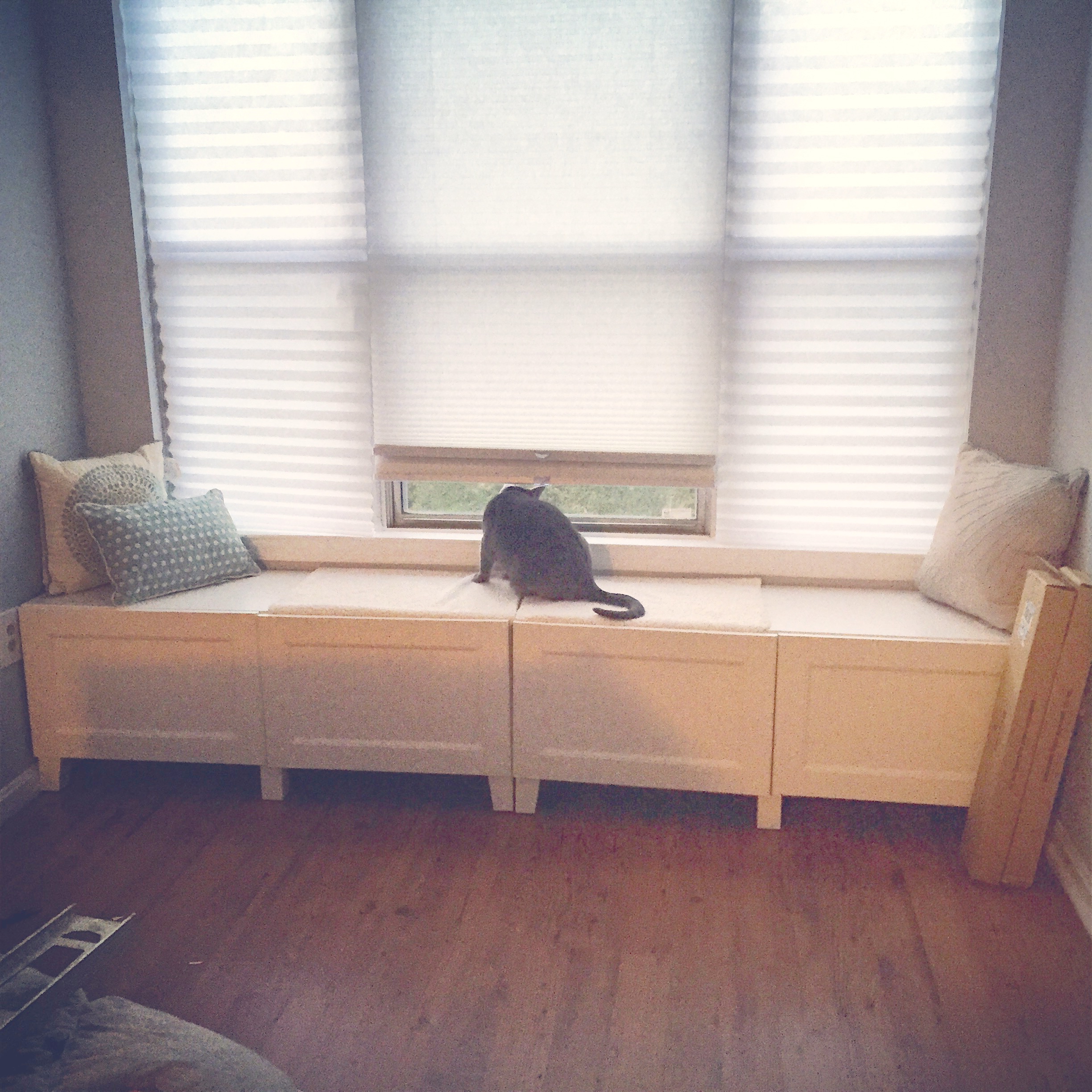
Second project of the week was putting together the window bench in the master bedroom. I never got to complete the entertainment center/desk combo I had designed for my old room, so I had left over cabinetry still in boxes. Turns out some of that cabinetry fit perfectly in the nook in the master bedroom. As expected, it turned into an instant cat magnet. Not expected was how the cats now growl at everyone walking by.

IMG_3682Other projects for the week included unpacking the several boxes of disorganized toiletries which are now stored neatly in plastic containers in the linen closet and master bathroom, starting to unpack things in the second bedroom (aka office/gym), and of course getting rid of the plethora of moving boxes that I’d been storing on the balcony until recycle day. I’m pretty sure I had more recycling than the whole building.

I wish I could say that everything turned out to be roses, but this week was full of plenty of fun new homeowner experiences. The biggest annoyance was that my Nest thermostat shorted out, a fun fact I discovered when I realized that my thermostat thought it was almost 80 degrees inside and there was only cold air coming out of the vents. While I wait for Nest to send out a new thermostat, I’m stuck using emergency heat. I’m thankful for heat, but more thankful that it’s finally warm enough that I don’t have to use it too often. If that were it, I’d have had a fun weekend, but I also got to deal with an overflowing toilet at 7AM and an incredibly slow kitchen sink which is great when the dishwasher and disposal are both not working.

On the schedule for this week:

  • Apply the top coat to the cabinet bases in the kitchen and bathrooms.
  • Get my office set up.
  • Getting the cats toilet training started.
  • Getting the remaining doors installed.
  • And getting the heat fixed.

Signature Update

Condo Project – Moving Day

It’s official! I’ve now moved into the condo!

Saturday was only a tentative moving day, but I was getting so stir crazy, I decided it was going to be actual moving day. There’s still plenty to finish up, but that will just have to get done while I’m there.

Around 10AM I finished my coffee and cereal bar (the only thing I managed to eat that day…), and got started packing.

I didn’t get any special truck or anything. We moved everything in my car, my mom’s SUV, and a tiny work van. Thankfully, I only moved a few miles away. If I hadn’t a big truck would have been better.

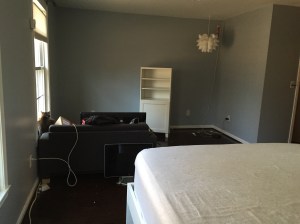
By mid afternoon, my room looked like this. The sofa was going to the dump, so all that was really left was a bookcase, my bed, and the necessities left in my bathroom.

IMG_3668

The final trip was the worst. By that point, everything was out of my room except for the TV, computer monitor, and cats (who don’t like cars…). Twenty minutes of cat wrangling and narrowly missing a plethora of opportunities to be scratched, we had all 3 cats in crates, and the last of everything packed up. I took the TV and monitor so I didn’t have room for the cats in my car, but I can only imagine how noisy that short 10-minute car ride was based on how loud they were just walking out of the house to the car. It didn’t take long for Skyler to claim the best spot in the house – the top of the cat tower which has a view outside plus views of the kitchen, dining room, living room, front door, and hallway.

IMG_3672At around 6PM, I sent everyone that helped move home. I was exhausted and ready to sleep. Sadly I was left with this, so sleep was not in my future.IMG_3669

The real problem, though, was that my bed looked like this!IMG_3670

I took it apart before moving it, hoping it would get less damaged in the move after seeing how badly it held up to being moved when the floors were installed in my old room. (To anyone who’s considering the Brimnes bed from IKEA, don’t. It gets damaged way to easily.) The bed frame faired pretty well, but the one piece I didn’t take apart, the headboard, got banged up even more.

An hour later, I had a bed.

IMG_3673

And before I eventually retired to that bed, my living room looked like this. Not bad for moving in that day.

 IMG_3674

The cats are still adjusting to the new place. Skyler seems to be handling it better than the other two. Chase is still incredibly scared and spends most of the day meowing loudly or under blankets hiding. Hopefully they calm down soon.

Signature Update

Condo Project – Week 6

The countdown is on, and my brain is in a constant state of “Are we moved yet?!”

Nearly everything but the necessities has been packed up since August which has been frustrating. Now that the seasons have changed from Summer to practically Winter, I’ve been struggling to not unpack everything before I move. My cats have also loved the mountains of boxes resulting in most of them starting to collapse in too. Some of them were so bad, I actually had to repack their contents in new boxes.

Little by little, I’ve been moving things over to the condo, but Saturday was probably the first real big move day. My goal was to get as much moved as we could, and we managed to fill up my car, an SUV, and a small work van. My hallway in my current bedroom was completely full of boxes for a large portion of Saturday morning and afternoon.

IMG_3643

By 6PM, we had assembled the “temporary” dining room table on loan to me until my farm table is built. The table was the same one I had when I was growing up, but it’s funny how tiny it looks in this room. I always dismissed the comments of how my dining room is bigger than my mom’s, but I think she may be right. With the leaf in the table (as it is in the picture below) this table barely fit in her living room.
IMG_3647

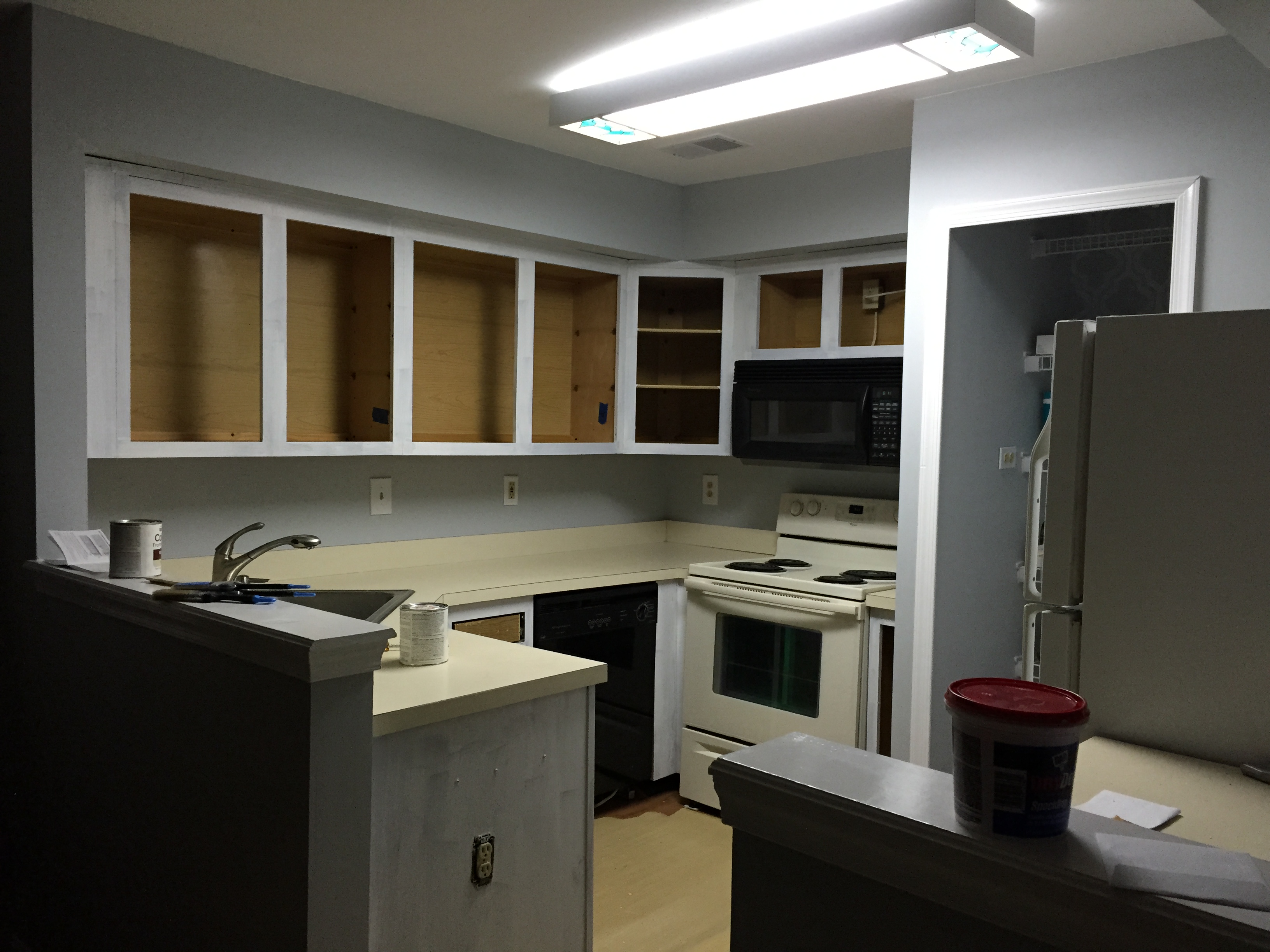
The next big project was tackling the cabinets. After cleaning layers of grease and gunk off of the fronts and insides of the cabinets and drawers, the first of two coats of paint went up on the cabinet fronts in the kitchen and bathroom vanities. The kitchen already looks much brighter. The jury’s still out on what I decide to do with the counter tops. For now I’m not absolutely hating the color against the white, and lets face it, nothing matches in there anyway (black dishwasher and microwave, white fridge, almond stove) so what’s a cream colored counter added in until I can get the kitchen completely redone.IMG_3645

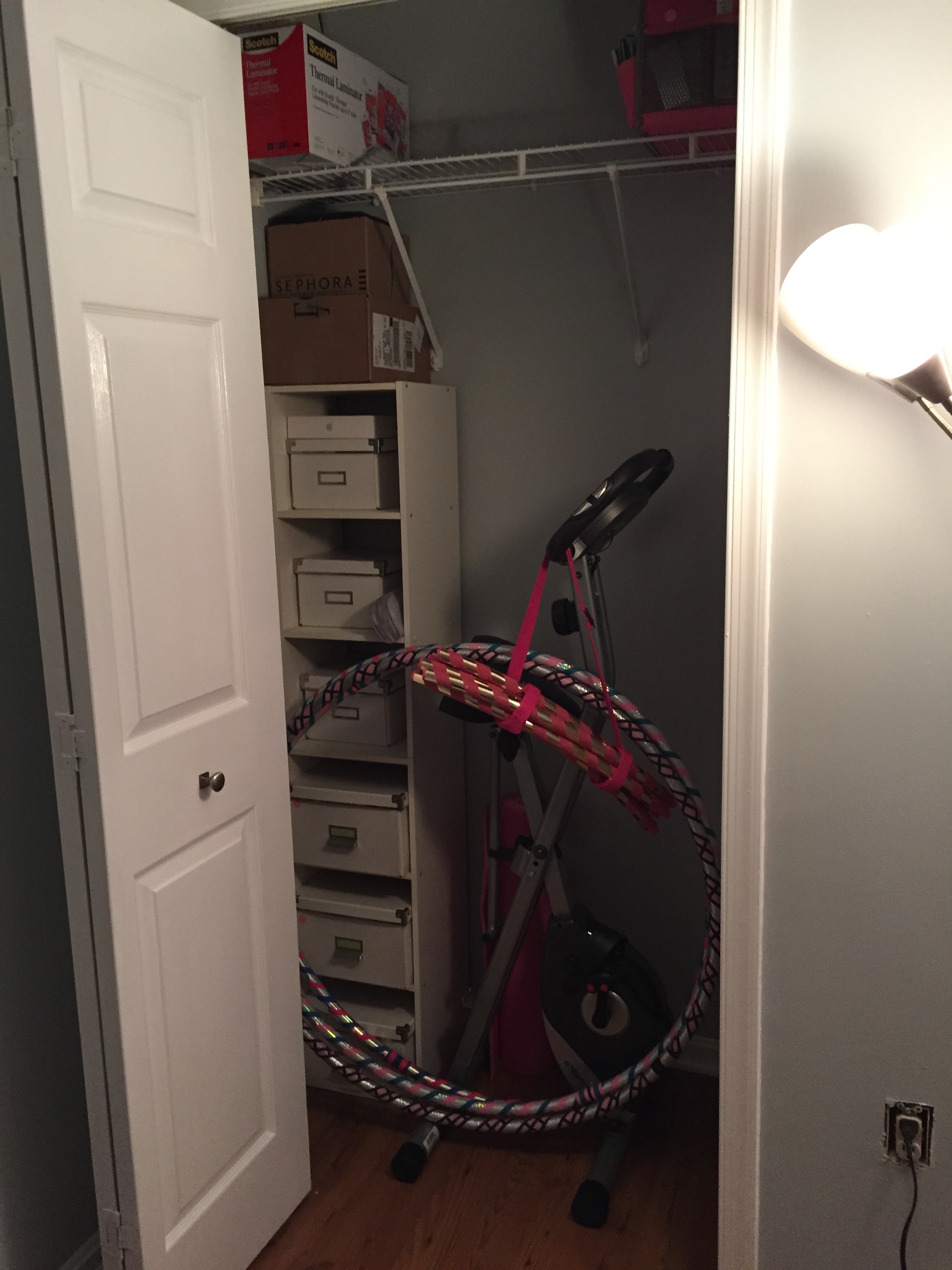
After everyone had left, I started putting things away. I managed to unpack a couple of boxes in the Master Bedroom and Linen closet, and also took a first stab at putting the Guest Bedroom (my soon to be Office/Gym) closet together. The guest bedroom has been serving as a catch all for all the boxes that we’ve been moving, but since a treadmill is coming into this room, I needed as much room cleared as possible.IMG_3646
Not pictured:

  • The remaining 2 closet doors were cleaned and got their first couple coats of spray paint. These two doors were louvered for the utility and laundry closets so painting them with a brush was going to be a massive ordeal.

That’s week 6. Not very eventful in terms of the condo because I needed a break so that I could focus on other things like school, work, and birthdays.

Signature Update