March 2014 Favorites

Monthly Faves March

Happy Friday lovelies!

It’s been a while since I did a monthly favorites post, but I’m back today with a bit of a nerdy, tech-centered list of faves.

First up, we have the UP24 band by Jawbone ($149.99). For those of you who didn’t know, the Fitbit Force was recalled due to a nasty rash that it was causing people. Despite using it for months with no issue, I was one of the unlucky people who eventually got the rash and I was forced to stop using it. I was offered a refund or my choice of other Fitbit trackers, but I didn’t necessarily want to downgrade back to the Flex. In the end I opted to go with the Up 24 band which has a lot of fun features like idle notifications and insightful tips that I’ve been enjoying.

Next up, is a terribly addicting game available for iOS and Android, Threes ($1.99). I downloaded it on a whim because it was popular. 12 hours later… I was still playing it… I’m not sure what it is about stacking cards to make combinations of 3s, 6s, 12s, etc. that is so addicting, but I’m sold. It’s a great way to pass the time, but given my 12 hour stretch, I’m always mindful of the time, because clearly I lose track quickly with this game.

My third favorite is BusyCal ($49.99). I have to admit this one is a bit unexpected. For years, I’ve had a Fluid app running Google Calendar on my Mac. I know I could have used iCal, and that would have been my preference, but I make changes to events frequently (e.g. when a student is late for a shift), and I hated that iCal didn’t allow me to make changes without sending an email to anyone attending. It does way more than just that though, so if you’re looking for a good calendar app for OS X, check it out. BusyCal has solved so many of my calendar issues, and I’m kicking myself for not giving it a fair chance sooner.

Here’s where it starts to get nerdy. My fourth favorite for the month has been Keyboard Maestro ($36). I’m a firm believer in the idea that computers should make your life easier. If I find myself doing something on my computer more than once, you can bet I’m going to start looking for a way to have my computer do it. Keyboard Maestro is one tool I’ve added to my toolkit to save me time. I’m still playing with it on a regular basis to tweak and add things, but for now some of my favorite “macros” are the ones that get my computer set up for my day at work and close programs before I leave for the day. My latest addition has been a macro that draws a red circle around my mouse when I hit a certain hotkey because having a 27″ display and my 15″ display on my MacBook Pro equals plenty of room to lose my mouse. {First-world problems…}

And last but not least, we have TextExpander ($34.95) and its iOS counterpart, TextExpander Touch ($4.99). Seriously, why did I not buy these sooner. Working in tech support, I’m constantly typing the same thing over and over. Our support knowledgebase has reduced that significantly because I can now just send customers links to our articles, but there are still things I type constantly, for instance, the links to those articles. I also use it to generate emails I regularly send to people. Another use I’ve found is remembering required information. When we hire an employee, I have a snippet that inserts the list of required information I need to submit to our payroll preparer which saves me having to find the email that has the information in it. One of my most used snippets is my gratitude snippet which gets filled in and logged each night before bed. I briefly described how I use it here.

Signature Update


Random Wednesday Post

Happy Hump Day!

Did you know that, 96 years ago, on this very day, Congress approved daylight-savings time? It was also the day the Academy Awards was first televised back in 1953. Okay, enough with fun facts… {I could go on with them all day… it’s kinda my thing…}

Today is my first day back to work since Thursday. I wish I could say I had a wonderful Spring Break {all two days of it, Monday-Tuesday…} but instead, I was stuck in bed with what I believe to have been food poisoning. To put things in context, from 5PM Thursday evening to 5AM Friday morning, I’d lost a whopping 4 pounds. I hate doctors, but after 12 hours of barely being able to move, I was pretty close to going to the hospital. In any event, I’m nearly recovered, and since feeling well enough on Saturday, I’ve been eating whatever I can to get calories back in me. {That may or may not have involved more than a few Frappuccinos…}

Sickness aside, I’m feeling 90% back to normal, and today I was pleasantly surprised to see that my online class is actually observing Spring Break {even if my office isn’t…} and I have no assignments due, so this week is a week to catch up, and get my life back on track.

I do have a fun nerdy tip though that I’ve been enjoying quite a lot. As I’ve mentioned before, each night, I like to make note of 3 things I’m grateful for in the iOS app Memento. I had the app set up to send me a reminder at 10:30 every night. However, I still had to open Drafts to use my TextExpander snippet which auto fills an “I’m grateful for…” template I made, send that to Memento and save. Too many steps… and then I found Launch Center Pro could use Text Expander snippets as well. Now, each night at 10:30, Launch Center Pro prompts me to “Launch Memento” with a notification. All I have to do is click the notification which takes me to Memento with the “I’m grateful for…” template already filled in. All I have to do is type 3 things and save. So much simpler.

More interesting posts to come soon, I promise.

Signature Update

When DVRs Go Bad

Folks, I have an interesting little piece of advice today. {Well, at least I find it worth talking about… whether you find it interesting may be another story.}

Those who know me, know I’m all about automating my life wherever possible. In fact, just this past week, I set my Mac up to automatically open and close my “work” apps when I’m at work. {It’s the little things…}

Naturally, a DVR was a lifesaver for me. My main reason for getting one was so that I could concentrate on more important things like schoolwork instead of whether or not I’d miss a show. {Pretty good excuse to tell my parent back in the day. Don’t you think?} What really happened is that I got lazy. I stopped keeping track of what shows I watched. I had no idea when they came on. I didn’t have to worry about recording them. It got to the point where I’d just come home, turn my TV on and watch a show or two that was recorded and go on with life. {On the bright side, I did stop watching TV as much.}

That all changed this weekend when I heard a strange noise coming from my TV area. Turns out, my DirecTV receiver decided to up and die. The noise was the fan trying to kick on over and over. Even better, thanks to the wonders of DirecTV tying DVR content to the receiver, I quickly realized, the 30% of space holding movies and TV shows from the past 3 years was gone. Thankfully, I am fairly good at staying up to date on the shows I watch, but I did face a few realities:

  1. I had started to rely on my DVR so much that I didn’t even know which shows I watched anymore.
  2. I certainly didn’t know when shows came on.
  3. I had no idea what shows I was going to be missing or had already missed.

My first plan of action was to start rattling off shows and recording them as a list in Evernote. {DirecTV only lets you record 50 series, so how hard could it be to remember the ones I scheduled, right? – WRONG} Thankfully, the internet came to the rescue and a quick Google search brought me to The Futon Critic where I spent an hour or so browsing the A-Z section of TV shows filling in the list. I’m pretty confident I haven’t missed anything at this point. {If I did, oh well.}

The replacement receiver was supposed to arrive by this Friday (the 14th) {It came yesterday :)} so I wanted to know which episodes I had missed or would be missing. My Evernote list therefore evolved into a Google Spreadsheet where I started noting whether each show was currently running and if so, when it came on, what channel it aired on, whether I’d actually watched the most recent episode, etc. This sort of worked, but it was too much work keeping it up to date.

Eventually, I decided this fiasco couldn’t happen again {and it inevitably would whether the receiver failed or I got a new one}.

In the end, I revisted a site I had used a few years ago, Episode Calendar. I signed in to my account I had made already and added the shows I watched. Now I have a list of what I watch, when it comes on, and I can also note which episodes I’ve watched updated by all the fine folks that keep the lists up to date. It even has a calendar feed so I can add my TV shows to my Google Calendar! {Bonus feature: it keeps track of when shows are cancelled so should I ever hit that 50 show cap on my receiver I can know which ones to delete.}

Lessons learned:
– DVRs cannot be backed up.
– They will fail or need to be replaced.
– More importantly you cannot rely on them to remember which shows you like, when they come on, and what you’ve watched.

From now on, I’ll be tracking my shows with Episode Calendar. As for the movies, thankfully I’ve been making a task in my to-do app any time something’s set to record so I could make sure it actually recorded {smart thinking, Andrea!}, so I had a record of all the movies I had recorded. All I had to do was figure out if I had actually watched them or not based on whether I rated it in Netflix. The ones I didn’t watch got added back to Netflix.

Signature Update

March 2014 Update

Can you believe it’s already March? I actually did a double-take before I threw out my February desk calendar just to make sure it was actually March.

February was a crazy month for me, so I apologize for the lack of posts. Being short-staffed in the office with no ability to hire anyone until April has been incredibly fun, but admid the chaos of stressful days, it wasn’t all bad. I was also able to be part of my oldest friend’s wedding which was nothing short of a fairytale ending (literally… it was Disney themed since she loves Disney.) I couldn’t pick up my dress from getting altered until the night before the wedding thanks to snow so I was thrilled it fit. Plus I had a blast getting my hair done and makeup airbrushed. I even got fake lashes. I went super simple with my nails because I didn’t want acrylics. It was all well worth it, but I have to say I’m super happy to be able to relax and be home before 9PM again.

wedding copy

My focus for 2014, simplicity has been going well. My mountains of paperwork {okay… that may be a bit of an exxageration} have been tamed. I even started scanning in my old Filofax pages. I also took some time to organize iPhoto which was basically like one of those closets that’s become such a disaster you avoid opening it. I’ll be posting something about how I eventually decided to set it up at some point.

For March, the plan is to focus on a few things:

  • Returning the broken/damaged parts of my bed and finally getting it put together.
  • Getting back on track for my goal of reading 52 books this year. According to Goodreads, I’m 3 books behind schedule.
  • Continuing to perfect my digital planning system.
  • Working on getting my finances back under control. Again, I don’t have much of a balance on my credit cards, but I’d rather there be none.

What are your plans for March?

Signature Update

An Updated Look at Digital Planning

Today, I thought I’d share an update about how my planning system has evolved. To my surprise it’s working out great, and yes, I’m still all digital. I’ve made some tweaks and changes here and there, but the main set up of my system has stayed fairly consistent.

  1. Calendar – Google Calendar
  2. Task List – Omnifocus
  3. Daily Habits – Habit List
  4. Information – Evernote, Box, Google Drive

My calendar set up hasn’t really changed much since my last post. I’m still using my many Google calendars, but I’ve gotten rid of some and added some new ones. As of now this is my list:

  • Personal
  • Finance
  • School
  • Work
  • Home (a calendar shared with my mom so that I know when she will be home)
  • Student Employee Schedule

The next part of my system is my task list. I wrote a few posts about how I used Things. For now, Things is no longer part of my system, and I’ve moved over to Omnifocus. I’ve had to sacrifice Things’ pretty UI, but Omnifocus has made up for it with features like due dates with TIMES and perspectives. I’ll save the full Omnifocus write up for another day, but for now, let’s just say, perspectives are life changing.

I keep my habits separate from Omnifocus. There are some things like going to work, working out when I wake up, or flossing where seeing the chain of consecutive days I’ve done the task serves as major motivation {Thank you Jerry Seinfeld}. For tasks like these, I’m using Habit List which seems to offer the best mix of customization and looks that I’ve seen.

All my information (files, reference materials, etc.) are stored in 1 of 3 places. Evernote is my place for general notes (e.g. reading notes, project ideas, random recipes, and other miscellaneous information I want to refer back to.) My university Box account holds all of my school and work files. Google Drive holds the rest of my files that aren’t work or school related. All of these sync to my computer and mobile devices so everything is with me at all times.

Bonus (Journaling and Health/Fitness Tracking):

I’ve been trying to do better at recording things that happen in my life. For those I use a few apps.

Momento serves as my “journal”. It pulls my various social media feeds in automatically, and I try to log 3 things I’m grateful for each night before bed here as well. I’ve found that it’s a nice way to wrap up the night in a positive way, and scrolling back through the days to see the little things that made me happy is also pretty cool.

I track my health using a combination of apps. With the Fitbit Force being recalled, I’ve switched to the Jawbone Up 24 as my primary fitness band. The UP app is pretty awesome, and it records my steps, sleep, and a plethora of other things. I still use my Fitbit Aria scale so I do still use Fitbit, but the scale syncs to MyFitnessPal which syncs with the Up band. I also use MyFitnessPal which seems to offer more options for logging workouts and food. Together these apps work great together. Just this past week, I had been waking up in the middle of the night, and without these apps, I probably wouldn’t have ever noticed that I was waking up at exactly the same time each night presumably due to something happening in my room at that time.

So I hope you’ve found this little overview of how I stay semi-organized. Let me know if you have any questions or if you’d like to hear more about anything.

Signature Update

My NuMe Nightmare

Hi everyone,

Today, I’m sharing my experience with NuMe, a company that gets quite a bit of buzz on the internet for their hair care products.

I’m going to backtrack a bit for a second. I’ve been using the same Conair hair dryer since before I was in high school. In the past 10 years or so, I’ve never had any problems with it until it started making a weird noise about 2 weeks ago. After 10 years, I can justify getting a new dryer, besides I have a horrifying memory from my middle school years of one of my friends bringing her hair dryer downstairs glowing orange {like the glow of molten metal} and ever since then, I’ve been terrified of any malfunctioning device that could potentially set my hair on fire {especially given my inability to smell smoke}, so I immediately started looking for a new hair dryer.

I’d been looking online and have had my eye on two hair dryers for quite some time now. The Misikko HANAair hair dryer ($194.99 on sale…) and NuMe’s Signature Ionic Dryer ($219 on sale…) Naturally, these were “investment” pieces, and I wasn’t exactly ready to drop $200 on a hair dryer, so I was happy to find a 70% off promo code for NuMe.

And that’s where the nightmare starts…

Upon checking my receipt, I realized the promo code only took off 60% not 70%. I immediately contacted NuMe’s customer support via email explaining the issue. This was the response I received:

Thank you for contacing NuMe. In response to your question, codes are only valid for single use, and are applied to all eligible items in your cart at the time you complete your order. Once used, your code is considered redeemed, and cannot be used again, even if the total amount of your card did not meet the full promotional value of the voucher or coupon you are using.

Basically, they stated that because the code was used, they couldn’t issue me a refund. But wait? Didn’t I order it from you? Weren’t you the company that charged my card? Of course you can issue a refund. I replied explaining this, and got this response:

Thank you for contacting NuMe. Insider70 was an offer that has expired; however, it was extended as a courtesy but with a 60% off instead of a 70% off. We apologize for the inconvenience this may have caused. Please keep in mind that offers are subject to change without notice.

So now they are saying the code was expired, and they gave me the 60% off as a courtesy. Had they just come out and said this with some sort of notice like “This promo code has expired, but we have taken 60% off as a courtesy,” I’d have been satisfied. Instead all I got was an email saying they’d forward my feedback to marketing.

During this ordeal, I actually reached out to them via their Facebook page as well, and they apologized asking me to private message them. I did so promptly, but sadly never received any response.

I wish I could say that was the end of my NuMe nightmare, but it gets worse.

My Signature Ionic Dryer arrived on February 12. I was excited to have a “working” hair dryer that didn’t pose any risk to setting my head on fire at any moment. The dryer comes with 2 concentrator nozzles. Naturally I tested everything out of the box. Hair dryer works – check. Everything is included – check. Concentrators fit – WRONG.

The concentrators did go on the hair dryer, but before I could move the hair dryer to my hair, they’d slipped off the slippery “soft touch finish” and landed on the floor. My first thought was that I must be doing something wrong. Maybe I’m not pushing them on far enough. Maybe they interlock somehow. All my efforts failed, and I contacted support once again.

The same gentleman I’d previously been dealing with responded to my new request, and explained they’d send out replacement concentrators. At this point I was hopeful. This was the first time I felt like NuMe support might not be awful. That hope was shortlived though.

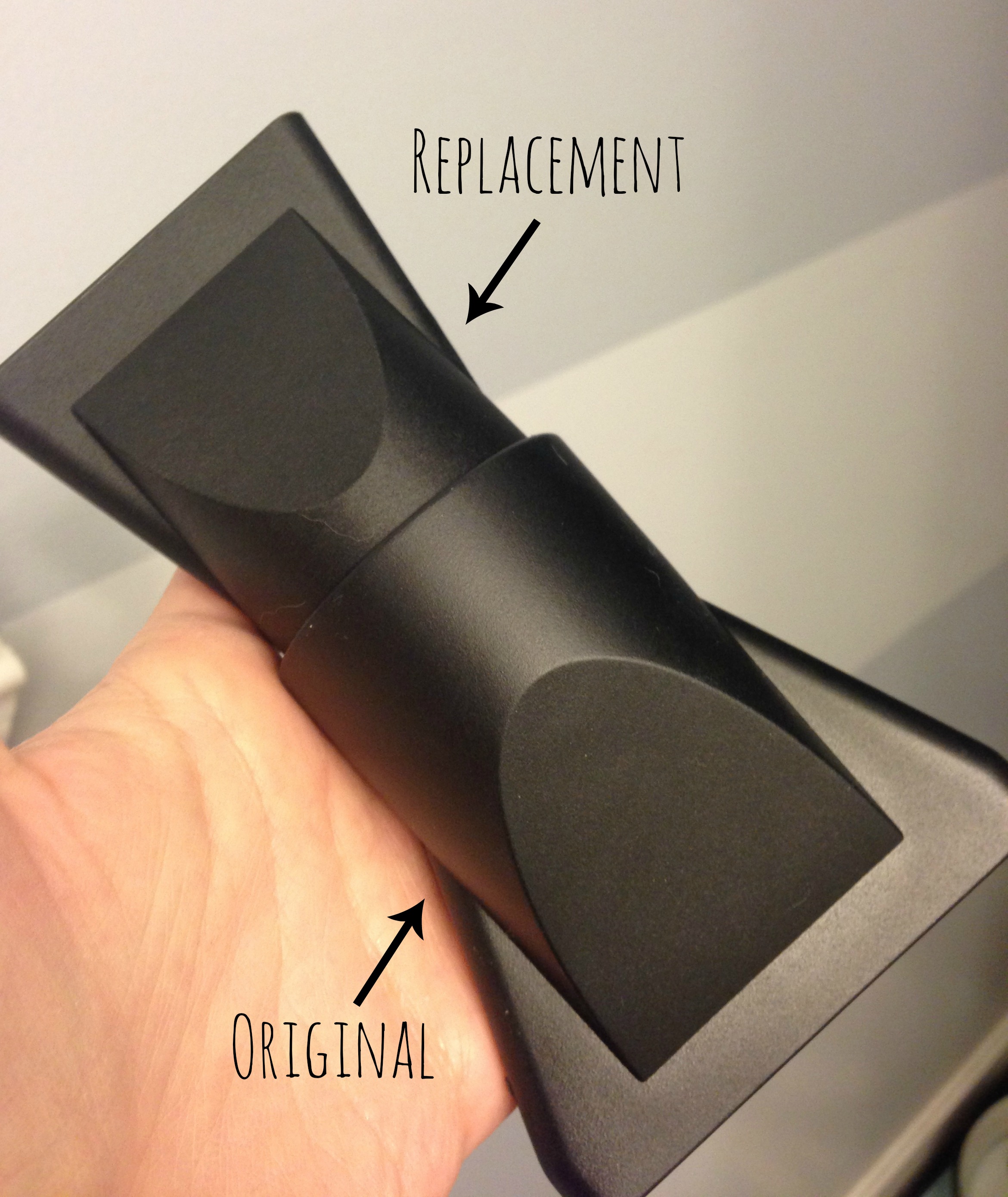
The concentrators arrived fairly quickly. Sadly they also did not fit. These wouldn’t even fit over the nozzle part of the dryer. In fact, they were so small, they fit INSIDE the original nozzles I had received.

I once again contacted support explaining the issue. This was the response I received:

Thank you for contacting NuMe. We apologize that you are having trouble with your Hair Dryer, please be advised that these nozzles were tested prior to being sent and proved to be in working order. We recommend switching out the Hair Dryer as that may be the problem, or we can approve your return for a refund for the purchase price. Please advise

Now this first bit shocked me. I’m not sure which dryer they tested it on, but it certainly wasn’t the one I had (one of the only two models they sell).

At this point, I explained that if the dryer was defective, I would be happy to just to return the dryer and get a refund. While at it, I included this picture in my response to illustrate how well the replacement concentrators fit:
IMG_2874

The next response I got was even better….

Thank you for contacting NuMe. Please be advised that according to these pictures the nozzles you initially recieved were for the Classic Hair Dryer which is why they fell off, the 2nd set of nozzles should work fine with your Signature Hair Dryer; however, as advised we will accept your return, please return all items to :

NuMe Style
7028 Valjean Ave.
Van Nuys Ca 91406

Also, please be advised that we will not send a Pre-Paid Label you must return the items at your cost, please obtain a tracking number when doing so to avoid the item being lost or stolen and to reassure that a refund will be issued.

So now he’s telling me the nozzles I received IN THE BOX originally were the wrong ones. {Wait what?} NuMe ships the Signature Ionic dryer with the concentrators for the WRONG dryer?! The replacements which didn’t even fit were for the right one? And on top of that they expect ME TO PAY to return their defective product?

At this point, I’ve dealt with being overcharged, shipped a faulty product, spent week dealing with customer support, and now I’m being asked to pay for returning a defective product. I do not think that asking for a prepaid shipping label after all that is that much to ask for.

I’ve written back asking to have my issue handled by a supervisor. I fear, however, that this issue will need to be escalated to the Better Business Bureau.

As someone who works in the customer support field, good support is something I really pride companies in, but I’m also fairly lenient when it comes to understanding support is a tough job. You’re faced with policies that may not always be fair to the customer. I want to give this gentleman the benefit of the doubt. However  I really do hope that NuMe changes their support model in the future, and I hope that in writing this, it will save someone the trouble of this potentially happening to them.

I, for one, know I will not be purchasing anything from NuMe again. I will also not be recommending the company to any one who asks me for recommendations. It really is unfortunate considering I had hoped this to be the first purchase of many. As for my hair dryer, I’ve ordered a Conair Infiniti Pro Hair Dryer which was under $35. Lesson learned – more expensive isn’t always better. Hopefully this one works out better than NuMe.

Update: I’m not sure what happened – whether it was my Facebook posts, tweet, this blog post, or just NuMe realizing the error in their ways, but they did agree to send me a shipping label. They claim they are shipping one [the label] again, which is news to me because they haven’t shipped one before. I’m also not sure why they wouldn’t just email one to print out, but in any event, I’m hopeful that this will be the beginning to getting the issue resolved.

Update 12/9/2014: I’ve been using my Conair Infiniti Pro Hair Dryer for around 8 months now, and I love it. It worked much better than the NuMe dryer and for the price, you just can’t beat it. Plus it’s by far the best looking hair dryer I’ve ever owned. When I pulled it out of the box, I couldn’t help but marvel at the color. It reminded me of a fancy car paint job.

Signature Update

My Secret Life of Blogging

I have a confession to make. I’m a closet blogger. Is that an actual term? Probably not.

I’ve told very people I know in real life that I blog. I’m sure they could find this blog if they wanted to. After all, I have quite a few of my social media profiles linked to the site, and every so often, I see that people are getting to my blog by directly searching my name or something. {I’d hope the only people searching my full name are people who know me.} My blog’s public, it should be expected that people are going to find it. I want people to find it otherwise I wouldn’t be posting to a blog.

The thing is, whenever someone I know tells me they’ve found my blog, I’m immediately horrified. It’s like they’ve somehow stumbled into my diary of secrets – my secret life of sorts. It’s not like anything I post on here is horribly embarrassing though, so I started wondering why it bothers me so much.

I own the fact that I’m awkard and weird. Anyone close enough to me knows I’m slightly obsessive over certain things or that I enjoy technology and planners. I spend an inordinate amount of time finding really geeky ways of doing things to make my life easier. I’m super focused on my career, and my pets mean the world to me. If people I know already know this, why do I care if people I know read what I post on here?

I think my fear is that maybe my friends have never really grasped how weird I actually am. Now I say weird lightly. I believe everyone’s weird in their own ways and that’s perfectly okay, but I worry that they’ll see this blog and think, “Wow, she has an unhealthy obsession with Filofaxes!” or “She’s thought way to much about this particular program”.

It’s not just weirdness though. Part of me is waiting for that one day when my blog is really successful and I can say something like, “ What? You haven’t seen my blog yet?!” I love reading super put together blogs, but those people have been blogging for a long time, and they do it for a living. Blogging isn’t my main main job and this blog is fairly new, so the reality of having some crazy popular blog isn’t probably coming anytime soon.

Let’s face it though. This is me. This is my blog. Maybe I should start embracing it more.

Signature Update

Going Paperless in 2014

As part of my goal to simplify in 2014, I decided to clean up my paper storage. Granted, at 23, I don’t really have that much, but I grew up in a house where as soon as you got a car, gadget, or pet, you started a binder or at least a file and that’s where everything and anything about that item went. With 3 cats, a car, and being the gadget lover I am, that’s a lot of binders and binders take up a LOT of space. More importantly, I have a bad habit of throwing things inside the binder/file with no regard to having to find it easily later, and that’s if they even get to the binders in the first place.

This of course, led me to my first simplifying project of 2014 – going paperless.

Note: Links on this page may contain affiliate links. I’ve not been paid to mention any links on this page. All recommendations are my own. 

First step – Go through the paper.

I went through everything quickly. Product manuals can usually be found online these days so no sense in keeping them. I set them aside and went online later to find PDF copies. Once I found them online, I tossed the originals. As I was going through papers, I found I kept a lot of things that I didn’t really need like packing receipts for Apple products when I had the actual receipt saved already. I even found an old newspaper clipping of the ad for the people we got Abu from. {He’s nearly 10 now, so I doubt that’s necessary.}

Second step – Decide how I want to store them.

I highly recommend doing this BEFORE you start messing with scanning everything. I started with Evernote, and later realized I didn’t care for how difficult Evernote made it to export multiple PDFs at once. Moreover, I never bothered to name my scans anything useful, so after spending an hour and a half moving things back out of Evernote, I had to rename them as well. Lesson learned.

I read David Spark’s Paperless Field Guide, and I highly recommend it for anyone who’s thinking about going paperless. He discusses a lot of things like file naming conventions, tools, storage options, and workflows that I never would have even thought of. Plus it’s loaded with screencasts.

In the end, I decided to adopt a folder based system rather than using some sort of software. David Spark’s file naming conventions were also really helpful, e.g. if I were to save an invoice for a vet appointment Chase had today, I’d name the file 2014–01–07 vet invoice chase. {Note: I’m not normally one to not use title case, but it really is nice to not have to worry about what should or shouldn’t be capitalized, and the goal of this really is to make things simple.} End result: I can quickly see files sorted by date AND name at once. Using the pets as an example, this was really helpful in seeing when they switched vets or had visits to the emergency animal hospital because they stood out. I can also see which animal(s) the receipt is for.

Third step – Get a scanner.

We’ve always had a scanner in our house whether it be part of a multi-function printer or a standalone printer. Either way, they were always a flat bed scanner {Great for pictures; not so great for scanning buttloads of documents.} I originally had my eye on a Doxie Go {which I may still get one day for quick scanning}, but when it comes to going paperless, you really do need a scanner with a document feeder. I know Fujitsu’s ScanSnap line is what everyone raves about and in a perfect world with unlimited resources I’d have gone with a ScanSnap iX500, but I actually got fantastic deal on a Canon P–215 for under $180. {I’m a Canon fan anyway so this was a no-brainer.} Even better, it’s small, so I can pop it in my bag or throw it in a drawer. If I’m honest, it’ll probably live on my desk though.

Fourth step – Start scanning.

My scanner is scheduled to arrive today. {Hopefully… It was originally supposed to be here yesterday.} Once it arrives, you can bet I’ll be scanning things left and right.

Fifth step – Develop a workflow.

In order for this whole “going paperless” thing to work, it really needs to become part of my daily routine. When I get home, mail needs to be sorted; junk needs to be trashed; things need to get shredded, and important things need to get scanned – immediately, no questions asked. Piles tend to turn into overflowing mounds quickly in my house.

Another thing I plan on leveraging is Hazel. Hazel’s been one of those things I’ve had on my Mac, but honestly never really found a use for. As part of simplifying, I’ve really been trying to be more mindful of the things I do on a regular basis. If I’m consistently renaming a file and moving it to another place, why not let Hazel do it for me. It’ll be like having my own personal secretary to file away papers for me. How cool is that?

So that’s project #1 for simplifying 2014. I’ll be back with updates on how this is working for me, things I’ve learned along the way, and any tips and tricks I discover.

Signature Update

2014 Goals

Last year, I wrote out a ton of goals and lost them. Somehow I managed to do a pretty good job at completing most of them though.

This year, I went with a different approach.

For 2014, I decided to have 1 main focus and a few goals.

2014’s focus will be to

simplify

how I do things.

what I buy.

what I already have.

You get the idea.

Goal wise, the plan is to do the following:

  • Read 52 books
  • Identify {and do} 3 tasks each day
  • Exercise at least 3x a week
  • Drink 56 oz. of water a day
  • Run a 5K
  • Purchase my bedroom furniture
  • Connect with people and actually go out and live a little
  • and last but not least, not neglect this blog as I have been doing.

Happy New Year! Thank you all for reading! Here’s to making 2014 even better than the last!

Update: Apparently the trend this year is having one word to focus on for this year. I had no idea when I wrote this post, but apparently I’m going along with the trend.

Signature Update

What I Learned in 2013

2013 definitely taught me a lot about myself. For the first time in my life I found out that I have hobbies outside of “liking animals.” {I don’t think that actually counts as a hobby, but I never had anything better to tell them.}

Tone It Up introduced me to a world of fitness and clean eating. This time last year, I’d have laughed at you if you told me there’d be a treadmill in my family room, and I’d have weights under my TV.

I also discovered hoop dancing. I knew that I was going to try it, but I didn’t realize how much fun I’d have with it, nor did I ever think I was going to be any good at it. For anyone who ever thought they couldn’t hoop as a kid, I highly recommend trying an actual hoop made for adults. I can hoop for hours with a good hoop, but I can’t hoop for 5 seconds with the one I had as a child.

When I wasn’t exercising, cooking, or hoop dancing, {and I wasn’t at work…} I was probably reading for most of the year. Sitting outside with a drink from Starbucks and my Kindle became the norm for a while there.

Not all my hobbies were great though. I seem to have developed a bit of a shopping addiction. I wore a uniform from the time I was 6 until I was 17. I owned maybe a total of 6 pairs of shoes and wore a t-shirt and jeans every day. Now, I have a whole closet full of just shoes and an overflowing walk-in closet with more clothes than I know what to do with. I may have a problem…

I think I grew the most in terms of my career though. {And considering how much time I spent on it, I suppose it should be…}

When I was in college, I did my best to be invisible which is pretty hard when your super-outgoing mother’s worked there for your whole life. This year it became clear that I’ve unknowingly managed to undo all that hard work though. Maybe it’s the training demos I’ve been doing, or maybe after 5 years, my name is finally getting out there, but I find myself saying “Hi” to people quite a lot now. In fact, I even found myself introducing my mom to a few people at this year’s holiday party {again a pretty big deal when she’s been there for over 20 years…} I think the most surprising part is that I don’t mind this as much as I thought even being as awkward in social situations as I am. If anything, I’m pretty proud that I’ve managed to somehow stay connected despite being on the other side of the pond {aka my University’s pond that sits between my building and the rest of the main buildings on campus}.

I also realized Instructional Systems Design was not the right program for me, and I’m now in the process of pursuing another path that will hopefully lead me back into technology NOT training. {Note to self: If you don’t want to teach, don’t take courses related to designing teaching programs…}

I think the most important thing I learned this year however was to just be me. I may not be planning a wedding on Pinterest. I may not be posting baby pictures on Facebook. I may still be looking for Mr. Right, and still in school, and I may be living at home to help my mom pay bills – All things that I thought I’d have figured out by now, but I do have a wonderful, well-paying job that’s willing to pay for graduate school. I have some pretty great people in my life who have stuck by me no matter what, and I have some amazing animals that wake me up with kisses even when I look like hell and don’t want to get out of bed. I’m happy and grateful for what I have and what I can provide for others, and that’s what really matters.

Here’s to the end of a wonderful yet unexpected year!

Signature Update