My {Filofax} Week 11


Paper Lovestory's My Week

It’s a new week, and boy am I excited.

Here’s my week:

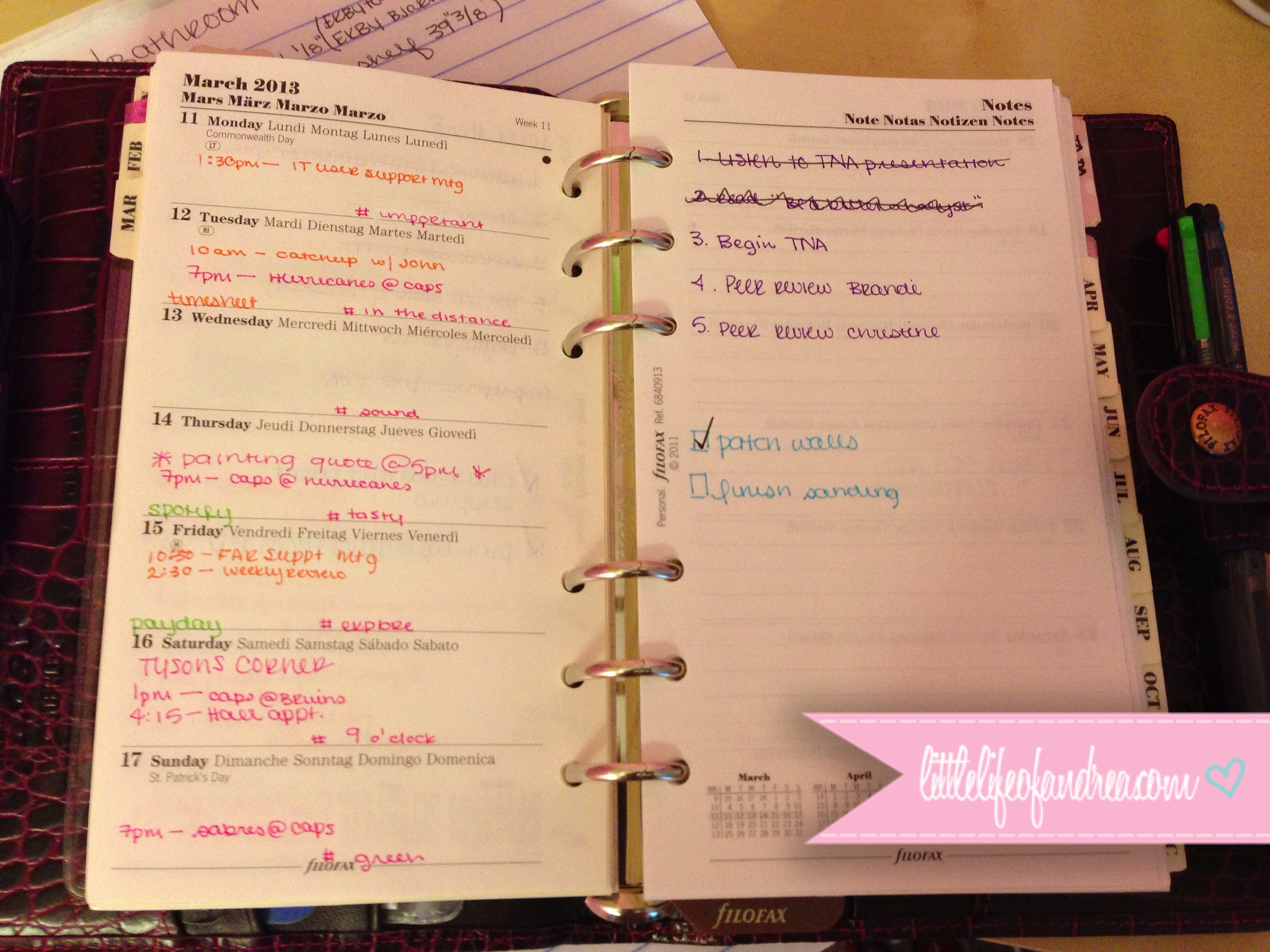
Week 11 Filofax

And for a quick recap of what happened {in case you aren’t at all interested in reading about my life}:

  • I spoke too soon about the photo challenge.
  • It was one of those meeting weeks at work.
  • We had a painter come over to give us a quote for painting my room.
  • Saturday started with a trip to Tyson’s Corner in Virginia.
  • I also managed to finally get my hair done.

And for the longer version {for those of you who like to read or are just nosy :)}:

I guess this was just one of those weeks where I was ready to be done. With Spring break coming up, everyone had a bit of Spring fever, but unlike the week before a break, this one was full of meetings. I didn’t feel that any of them were terribly productive. Many of them were just ways to catch people up to speed.

Everything seemed to suffer a bit this week. I’m now pretty far behind on my photo challenge, so I’m going to take the next few days to catch up while I’m off. I didn’t exactly have a chance to slack off on my assignments though because this week everything was due by Friday night. I knew this at the beginning of the semester. I even took a quiz that said I was aware of this week being the exception to the due dates, but Friday morning, the reminder email from my professor came as a shock to me.

After going after the room renovations full force last weekend, I started to realize I may be in over my head. If my room wasn’t massive and I wasn’t so vertically challenged, I’d probably not be dreading so much, but hiring someone seemed to be an easy way out. We had a guy come over to give us a quote on pricing. I was honestly a bit shocked when he came back with a price of over $1000 for JUST my room. We already had the paint, AND I wasn’t even asking him to do the stripes on the one wall! Needless to say, I’m now gearing up to paint my own room.

Working full time has really screwed with my sleep schedule. I used to be a night owl and now I’m waking up at 7am without an alarm. Go figure. Saturday, after waking up yet again at another ridiculously early hour, I decided to venture down to Tyson’s Corner. It only took a few hours to realize why I never enjoy driving in D.C. or Virginia, but I survived.

new hair cut

Saturday afternoon, I managed to bite the bullet and get my hair cut and highlighted. I have a hard time going to get my hair cut. I’m really self conscious about my hair. More importantly I always find some other thing to spend the money on, but a Groupon deal for a place that had been recommended to me came up, $55 for full highlights, a shampoo, and cut at Kisner’s. After 2 years of not getting my hair cut or highlighted, it’s nice to have a bit of a new look. I got a couple inches taken off and a some layers put in so that my hair did more than just fall flat. Now that I’m a bit more blonde again, I also have an excuse for all my blonde moments.

So that was my week. I’m off until Thursday so I’m taking it easy this week or trying to at least. I’ve already managed to get injured with a nice gash above my lip. Thankfully, I escaped stitches.

Signature

{Filofax Friday} How I Got Out of Planner Fail

Planner fail seems to be a recurring theme amongst us planner addicts. Most of us always seem to be searching for that perfect planner – the perfect system. I’m no different. I’ve bought my fair share of planners and accessories to test out different methods and setups, but this year, I’ve practically banned myself from buying all things planner related. {With the exception of odds and ends to make my planner cuter as long as it doesn’t change the set up.}

Sorry guys, no fancy pictures this time around…

I assume my planner obsession started out back when I was in elementary school. At the beginning of every year, we were given a preprinted 8.5″ x 11″ week on two page academic planner specially made for my school. They were pre-punched to fit in a 3-ring binder, thin enough to keep in a 2 pocket folder, and had boxes with each subject already printed on them for each day. Some teachers required you to use them and even checked them before you went home at the end of the day. Others didn’t care. Since I attended the same school all the way through eighth grade, this was one of the things I looked forward to each year. If I could find one I’d share it, but they’re likely all tucked away in the basement somewhere.

In high school, we were given a ring-bound lined week on two page planner that was in between a personal-sized and A5-sized Filofax page. The front half of was the school handbook that had all the school policies and the times for all of our alternate schedules should we have had various delays or assemblies. {I think we had about 9 in total…} In my group of friends, these little books were always with us. We’d tape our class schedule to the front cover. The weekly layout was a pretty standard lined Week on 2 Page layout, but I have a feeling since most of us went to the same elementary school, we all adopted a method loosely based off of that elementary school planner and ended up writing the school subjects written down under each day. During free periods, we were usually drawing on them, highlighting the pages, or even carving designs in the plastic covers. It was like a secret competition with everyone comparing their handwriting, designs, and doodles to everyone else’s.

My first year of college, freshmen got a tiny pocket-sized,  I believe, planner at orientation. {I really don’t know because I found it utterly useless and threw it in a corner of my room somewhere.} After that, there’s somewhat of a blank spot in my mind until I started using Moleskines. I discussed my planner journey from then on in part 3 of my Filofax Tour series if you want to read .

The real problem started once I got a job and had money to buy my own planners. I’d buy a new planner every other month it seemed. I’d see the lovely pictures on the internet and think, “Wow, that’s a great idea! I want that!” Twenty minutes later, I was purchasing a new planner, and before long, I had shelves full of planners that I’d used for a week and gave up on. I’d spend more time setting up planners to get things done than actually doing the things these planners were supposed to help me do.

I had this idea that I could find the perfect system – one that would solve all my problems and make me super woman capable of doing everything, I just hadn’t found it yet. The obvious solution was that I needed to keep buying more until I found the right one. {What a silly idea!} There’s only so many formats and styles, and I had just about tried them all, so one day I sat down looking at my pile of planners and actually thought about why I kept buying so many planners. That’s when I stumbled across my first problem:

I didn’t want a planner that would help me be able to do everything. I wanted a planner that would everything for me!

I wanted a planner that would magically do all my work, so that I could sit back and relax, but let’s face it, that’s obviously never going to happen unless my life suddenly turned into a Disney movie {although it would be nice.} I eventually accepted the fact that no planner was going to miraculously get rid of the things I had to do and put me on autopilot so that I didn’t have to do a think, but using a planner could make all those things more manageable.

Then I read the wonderful Imy’s series on Falling back in Love with Filofax, and it was around that time I decided I would declare to use one and ONLY one planner for 2013. I gave myself 2 months to find what I wanted and then I was going to stick with it. No exceptions. I bought myself a few options and eventually opted to treat myself to a Plum Osterley for Christmas with the understanding that I wasn’t going to buy anymore.

Three months later, I’m still in the lovely Osterley, and the only change I made was swapping the lined week on two page diary for a week on one page with notes diary. Everything else has stayed the same, and I’ve ended up with my perfect system. I also figured out the other half of the reason I was always in planner fail. It wasn’t just that I wanted a planner to do everything for me or that whatever planner I was using wouldn’t work for me. The problem was pretty simple actually.

I was switching planners so often that I was never giving them a chance to succeed in the first place.

So to all of you who are stuck in planner fail:

  • Commit to trying one system and sticking with it – It will probably evolve a bit here and there as you use it, but committing to and sticking with a plan is how things get accomplished.
  • and remember, this is your planner – Everyone’s lives are different. What works for one person, whether it be full of cute doodles or incredibly neat and organized,  may not work for you, and that’s okay. Find what works for you and embrace it rather than trying to force someone else’s system to work.

Signature

My {Filofax} Week 10

Paper Lovestory's My Week

It’s a new week, and boy am I excited.

Here’s my week:

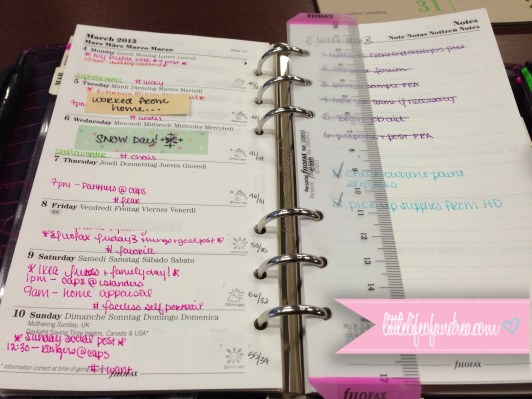
Week 10

Sorry for the bad photo angle.

And for a quick recap of what happened {in case you aren’t at all interested in reading about my life}:

  • This month’s photo challenge is going much better but not great.
  • I stayed home sick on Tuesday, but ended up working from home all day.
  • We finally had a  SNOW DAY {with no snow…}
  • Saturday was super busy, a home appraisal, IKEA’s Bring Your Own Friends event, and a trip to Costco.
  • Sunday was even busier thanks to inspiration from IKEA which kicked my room renovations into high gear.
  • March’s focus on budget is not going so well… AT ALL.
  • and I cannot wait for Spring Break (even if I only get 3 days off)!

And for the longer version {for those of you who like to read or are just nosy :)}:

  • Who knew that adding the photo challenge prompts to my online calendar AND my daily to do pages in my Filofax would keep me on the track?! I’m staying fairly on track with the furthest I’ve slacked behind being 2 {busy} days.
  • Monday evening, my throat was a bit scratchy, and later that night, I ended up with a fever. Tuesday morning, I barely had a voice, so I decided I’d stay home for the day to avoid getting anyone in my office sick. Normally when I’m sick, I don’t want to leave my bed, but I felt fine aside from sounding like a frog and the fever from the day before. I was wide awake though, so I pulled my laptop out and worked from 6am-5pm. I even kept to my usual work schedule and took a lunch break at 2pm.
  • Wednesday, everyone was predicting a huge storm to hit the East coast. We were supposed to get 4-8″ of snow, which is a lot for us. I was pretty excited when I woke up to see a light dusting of snow on the ground. My university closed, and I anxiously waited for the rain to switch back to snow around noon as forecasted. The snow never came, and the rain melted any snow we had gotten that morning. It was a REALLY uneventful day, but at least I had a day off.
  • Saturday morning we had an appraiser come to assess the value of our house. I keep my room fairly neat so I didn’t plan on cleaning more, but for some reason I went into “Clean ALL the things!!!” mode. Everything in my room usually has a place. If it doesn’t, I find a place for it or get rid of it, but occasionally, I get lazy and just put it in my inbox tray by my desk with the intention of getting to it later. Of course later doesn’t come, so the pile takes over my desk until I don’t notice them {or pretend not to.} Out of nowhere before the appraiser came, I threw everything that was out of place into a basket {and no, I didn’t hid it in a closet…} I sorted them into their respective areas {Office – Filing, Supplies, Coupons; Electronics; Closets – Travel Accessories, Jewelry, Pet Stuff, Tools; Bathroom}. In a matter of 20 minutes while watching a movie, everything was put away and sorted.
  • Saturday was a big day, the appraiser came at 9am. After he left, I had to rush to make it to IKEA for their Bring Your Own Friends event. I made it just in time to enjoy a free breakfast of eggs, bacon, and potatoes which was perfectly “Andrea-portioned.” {Just enough to make me energized for the day, not ready to go back to bed.} Taking a stroll through IKEA was a great way to spark my creativity. I also confirmed that I do like the furniture choices I picked out, and the all the measurements work out too. After IKEA, we stopped at Costco to pick up a few things. Afterwards, we went through the containers in the garage to see what painting supplies we already had. We found out we had most of the things already, and threw out a lot of trash in the process.
  • On Sunday, we had another fairly full day. We went back to Costco to pick up some more of the hangers I purchased the day before, AND drumroll… a new memory foam mattress for my room. We walked over to Walmart next door to pick up some groceries while we were there, and ventured back home so that the mattress could get a chance to expand in time for me to sleep on it. Then we went to Home Depot. $200+ worth of paint later, I got to check another item off the room renovations. {That’s for painting a few rooms, not just mine.} I got home and got to work on patching and sanding. My room and everything in it is now covered in a fine layer of drywall dust. {I really should have taken before pictures BEFORE the sanding.}
  • If any of you read my March Goals post, you’ll know my focus for the month is my budget. So far, that’s a huge bust. Many of my purchases were for deals I couldn’t pass up. Others started out as things I needed but ended up including a lot of impulse buys too. So in an act of trying to shock myself into some accountability, here’s my purchases from last week:
    • Sticky notes from K&Company – I didn’t need these, but now they fit Personal-sized Filofax pages, and I have actually started using them.
    • A free pair of glasses from Coastal Contacts but I had to pay $14.95 for shipping {I wanted to have an extra pair.}
    • A 4 pack of brush heads for my Clarisonic {20% off plus 8% cashback} from the Skinstore =  about $15 dollars per brush head
    • Hair ties and headbands from Mane Message – I’ve gotten similar ones to these before as samples, and I love them.
    • I picked up some hair supplies, vitamins, odds and ends from Drugstore.com – most of it was on sale, plus I had cash back
    • I bought a license for CleanMyMac2. – I had tried the previous version before and loved it so I wanted to support the developer with version 2.
    • I also picked up a travel bag for my Clarisonic. – totally unnecessary.
    • A 5lb. Kettle bell and 2 sets of dumbbells for working out. – the set of weights I had was too heavy so I got some lighter ones.
    • The Hunger Games trilogy on Kindle {on sale for $5} – I couldn’t pass it up.
    • Two sets of 35 no slip hangers – I’d seen online that Costco was selling hangers similar to Huggable hangers for only $9. I picked up a set on Saturday, and returned to get another set on Sunday.
    • The paint of course.
    • And the big one…the mattress. My old mattress was 12 years old and sagging in the middle. On Saturday, I found out Costco had a sale on a 14″ gel memory foam mattress for $399, so I checked it out on a whim. I was a bit concerned about the quality based on the price, so I went home and checked some reviews first. It’s not a top of the line mattress, but reviews weren’t too far off from Tempur Pedic ones either. It just didn’t have the $3000 price tag of the Tempur Pedic ones I’d looked at before. I figured that for the price, it was worth a shot. I also ordered a mattress cover for it since the people I’ve spoken with recommend always putting a cover on memory foam mattresses to protect them from moisture. The hardest part is finding sheets to fit it. My old mattress has gone to it’s new home in a spare bedroom to eventually be a guest bed.
  • With all that happened this weekend, I left myself very little time to do my school work that I had, as usual, saved until the last minute. I actually took a quick break from sanding on Sunday and submitted my assignment online while I was completely covered in dust. I’m actually pretty disappointed in what I turned in, but I just wanted to get it submitted.

Until next week.

Signature

{Filofax Friday} Using a Filofax in a Digital World

I work for my university’s Information Technology department. I’m constantly surrounded by all things digital. As I write this, I have my 27″ Apple display, a Macbook Pro with Retina Display, an iPhone 5, and an iPad all within arms reach on my desk. Sitting next to them all is my Filofax though. So how does someone in IT use both?

I’ve already given you a tour of my Filofax. Part one’s overview showed how everything’s arranged. Part two’s diary section showed how I keep track of meetings and due dates, and Part three showed how I use my daily pages. But… there was one thing missing – the backbone and brain of my system – how I keep everything scheduled, and how I remember to do things. I’d be lying if I said that I was super organized and my Filofax did it all. {I wish.} My Osterley does keep my life running smoothly, but it supplements my digital systems. I’m not sure I’d ever be able to use just a Filofax or just digital things. {This post is a little text heavy. Sorry.}

The Backbone – Google Calendar

My university has a contract with Google through Google Apps for Education, so I use Google quite a bit for work, but I even use it outside of work, because this system just works for me. I have calendars set up in Google Calendar for categories similar to the ones in my Filofax:

  • Social (pink)
  • Finance (green)
  • Personal (blue)
  • School (purple)
  • Work (orange)

I also have a few extras that either don’t need to be tracked in my Filofax, or  if they do, they get color coded as one of the areas above in my Filofax:

  • Student Employee Schedule (I make the schedule each semester for our student employees and this shows up on their calendar as well.)
  • Holidays (both my university’s schedule, and general US holidays)
  • Sports team schedules (Ravens, Orioles, Capitals)

The Google Apps suite is essential to the daily workflow of my department. We are all spread across campus so Google Calendar allows us to see everyone’s schedules and set up meetings. We use Google Drive to store the meeeting agendas that get attached to the meeting entry on the calendar, and send out meeting invitations using Gmail. Since Google is such an integral part of how we work here, it’s a good thing that this system works for me.

Each week, usually on a Sunday, I sit down and copy any new events to the monthly and weekly pages in my Filofax.  The calendars automatically sync to my iPhone and iPad. Depending on where I am, I pick and choose which way to view my calendar. If I’m out walking to a meeting across campus, it’s easier {and less attention-drawing} to pull out my phone and figure out where the meeting is than it would be to pull out my Filofax. When I get to that meeting, I probably have my iPad in front of me so that I can follow along with the meeting agenda online, but my phone’s in my pocket. In my office or at home though, I probably have my Filofax sitting close by. Either way, they all have the same information so I’m not missing out on anything no matter what option I choose.

The Tasks

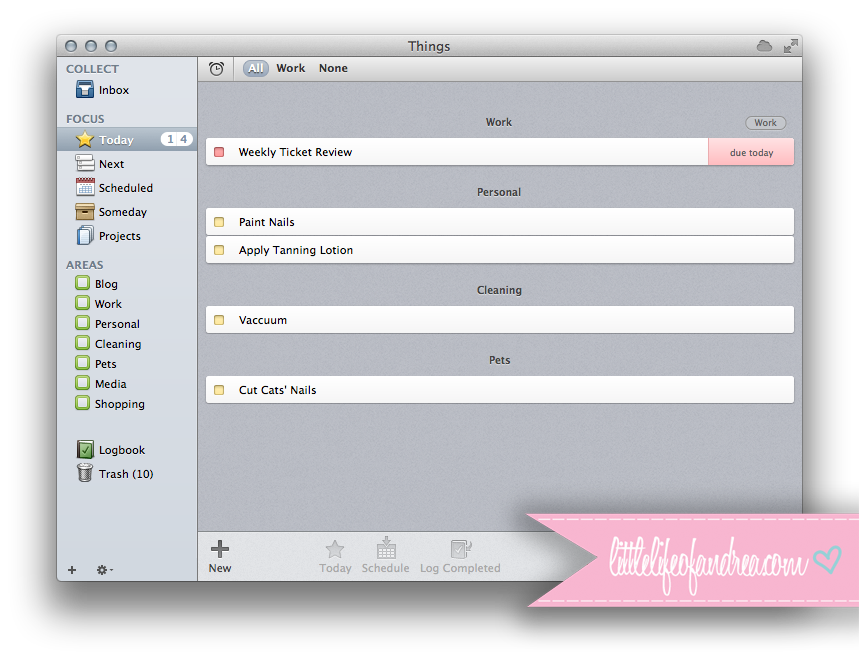
When it comes to recurring tasks, I’d be lost without the Things app. I have it on my Mac, my iPhone, and my iPad so everything syncs. I’ll admit I hated the apps when I first used them. Little by little, I found ways to use it, and now that it’s set up properly, it’s fantastic.I use Things as my master list. I know some people like to write down a master list, but I don’t like how cluttered that can get. Pretty much anything I have to do goes into Things first, and then gets transferred to my Filofax each day. If I think of something I need to do, I can put it into Things and set a due date or when to follow back up on it. Every morning, I get a list of “things” that I need to do for that day from Things, and I write them into my daily pages because I like physically checking things off. Once they are done, I get to check them off in both Things which saves them to a logbook, and in my Filofax which looks pretty.

things copy

I have the following areas set up in Things:

  • Blog – Any posts that I post every week {My Filofax Weeks, Filofax Fridays, Sunday Socials} and anything I post monthly like goals are scheduled here. I also keep a running list of post ideas. When I’m looking for something to post, I can look at the list to schedule one of the ideas.
  • Work – I copy over any items from meeting agendas into this list right after the meeting. I also have recurring things like when to submit my timesheet or when it’s my week to complete a weekly review.
  • Personal – I’m a forgetful person, so here I note when I need to repaint my nails, whiten my teeth, change my toothbrush, refill prescriptions, etc.
  • Cleaning – I hate cleaning. Without a schedule, I don’t clean. I’ve tried Flylady, but it was so detailed it drove me crazy. I ended up setting up a less detailed cleaning schedule in this particular section and it helps to keep me on track. Everything is set to repeat “on completion” rather than a specific day, so if I don’t feel like doing something, it rolls to the next day.
  • Pets – Having three cats is a full time job in itself, but mine are spoiled so they get their own category to remind me to cut their nails, brush them, etc. {Random fact: they are toilet trained, *weird… I know* so at least I don’t have to worry about a litter box.}
  • Media (more about this further down)
  • Shopping – I keep a running shopping list and wishlist here so that I can check things off while I’m at the store.

As you can see, some areas mirror whats in my Filofax. Others are broken down a bit more. For instance, in my Filofax, cleaning and pets fall under Personal and are color coded in blue. I don’t know why I do it this way, I just like breaking it down more in Things. Also, since my school assignments aren’t recurring events, I typically don’t put them into Things, because I’ve found it’s a waste of time.

So if any of you are still with me, congratulations. You’re almost to the end.

I have a Media list in Things but it isn’t for recurring events or tasks. I subscribe to Netflix for streaming and BluRay discs. We also have DirecTV at our house, and I happen to have a DVR. Each week, I look to see if anything in my Netflix queue might be coming on TV any time soon. If they are, I set my DVR to record them and remove them from Netflix, that way I can make better use of my subscription. I put an entry into Things with the title and time of day and set the due date as the day it’s coming on. I also remove them from the queue if they are going to be available via streaming soon. On the day it’s set to record or be available to stream, it comes up as a task (which I don’t put in my Filofax). If it doesn’t record due to conflicts or some other issue, I know to add it back to my queue on Netflix.

So that’s the last part of my system that keeps me organized. I like using them both for their own reasons, but a huge benefit is that information is always backed up in two places (online and on paper). I hope you enjoyed reading. Tune back in next week for some Filofax enabling.


Signature

My {Filofax} Week 9

Paper Lovestory's My Week

I feel like last week went by incredibly fast. I cannot believe it’s already March. February flew by.

Here’s my week:

Week 9 Filofax

And for a quick recap of what happened {in case you aren’t at all interested in reading about my life}:

  • I tried to add a bit more color to this week’s pages to go along with my wonderful stamps I got.
  • I had another presentation to make for work.
  • I actually began somewhat prepping my room for the renovations.
  • A new watermark for pictures.
  • Procrastination can effectively sum up this week.

And for the longer version {for those of you who like to read or are just nosy :)}:

  • Last week, I blogged about the wonderful stamps I got from Etsy. I’d been looking for stamps like these for a while so I was thrilled when I found them. They came from Korea, I believe, so it took a while for them to get here {mainly because our mail man forgot to bring them}. To go along with the stamps, I tried to add some color, but I must say, the color overwhelms me and I think I will tone it back for next week.
  • My work scheduled yet another presentation for me. {I really wish they’d understand, I don’t like public speaking.} After each meeting, they always tell me I did a good job and that I seem more comfortable. Truthfully, I still despise it. I’ve just kind of given up trying to get out of them because my whole department operates on the idea that you will learn to like it eventually.
  • For about 6 months or more now, I’ve been planning to redo my room. Currently it’s painted bubble gum pink and lime green. After almost 10 years, I’m ready for it to go. The hard part is going to be painting though. I really do not want to paint a 16’x21′ room PLUS my bathroom. {and I’m doing stripes on one wall too so that’s even more work}. So in catching up with my to-do list, I cleaned up quite a bit and did some organizing here and there. The big change was with my bathroom though. My bathroom is a bit odd. The first part of my bathroom, the sink area, has no door separating it from my bedroom. Then a door separates the sink area (and my bedroom) from the toilet and shower area. There’s a window in each area, but the door blocks one of them at all times depending on if it’s open or closed. It’s only myself and my cats that use my bathroom and it’s tucked around a corner so the door stays open 100% of the time. I made the decision to just take the door down, and I was blown away by how much light pours into my room now that both windows are accessible. Another great perk is that without the door taking up space, I got to move the cat’s food bowls onto the tile floor which will be a LOT easier to clean up.
Making the new watermark for my photos

Making the new watermark for my photos

  • I’m in the process of slowly figuring out this blogging situation. I picked up a copy of Blog, Inc., which I’ve been seeing a lot of lately. One of my sources of inspiration, Jen from OrganizedLikeJen also mentioned it in her video she recently posted on Youtube. I plan to start that this week. Another change I made was putting together a watermark for my images. Now that it’s made, I’m trying to figure out the best {simplest} way to add the watermark, put images on my blog, and what to do with the ones I’ve already put up both here and on Flickr. I really want everything to look consistent. {I’m a bit OCD.} If anyone has any tips or suggestions, feel free to leave them in the comments below.
  • This week was really all about procrastination for me. In some ways it was a blessing, and in other ways it was a curse. Instead of doing what I should have done in order to meet deadlines {blog posts, school work, etc.} I did everything else instead. The good part was that the “everything else” happened to be productive to some extent {cleaning, catching up on reading/YouTube, creative blog things, etc.} so I’m writing this in an incredibly clean room, the bad part is I didn’t do a lot that I should have done. In fact, I’m writing this right now instead of doing my assignment that is due in 10 hours.
  • Lastly, a quick update to my photo challenge challenges… in a my February photo challenge recap, I linked to the March list. When I actually read the link, I saw a fantastic little link to add all the events to your online calendar. Knowing how much I use Google Calendar, I did, and it’s been working out well. I also started adding the daily picture to my daily pages as a to do item just as an added reminder. So far, I’m on track.

Until next week.

Signature

{Filofax Friday} The Tour – Part 3

Welcome back everyone for the 3rd part of my Filofax Tour. Check out the first and second parts if you missed them. This week it’s all about my To Do section and how I use my daily pages within the section to keep myself from going crazy every day.

I’m going to give a bit of a backstory first to let you guys know how I arrived at this lovely set up which works incredibly well for me, so bear with me. {Feel free to skip down further to the Daily Page part, if you aren’t concerned with the history.}

Moleskine

I used to be a Moleskine user years ago before I stumbled upon Filofax. There was something about the artsy, adorable planner pictures on Flickr that made me fall in love, and before I knew it, I bought one, and the popular TriPlus Fineliners to go with them. My Moleskine planner was awesome until I found Filofax.

This Week on 2 Pages

I started off with a pink personal Domino, and after using it for a while, I agreed to let myself upgrade to a grey personal Malden. Everything was going smoothly until I decided the personal size was too big. At the time, I was only using it to hold a Wo2P calendar, so it was always fairly empty. I bought a pocket-sized Malden, but I immediately decided was too small. {I swear they look larger online.} At that point, a Moleskine seemed like a great option again, so back to Moleskine it was. This time I bought a Week Plus Notes planner AND the Color a Month daily set. Any due dates went into the Monthly/Weekly Moleskine, and I tucked the Color a Month planner for that month into the week to write my daily to do list.

So that’s how I ended up with my set up, but how did I end up back in a Filofax…

I had moved into my Moleskine because the personal sized Filofax was too big. The pocket size was too small. In theory, the Moleskine should have been just right {this story is beginning to sound like Goldilocks and the 3 Bears}. BUT… thanks to some enabling from the Filofax community, I saw organizedlikejen‘s Filofax videos, and then audreyswifelife’s video, I decided having projects and goals in life was something I needed to start doing. Of course my Moleskine had no place for any of that, and I ordered an A5 Domino in Deep Pink that came with atrocious rings which many of you will probably have seen on Flickr. I returned it and got an A5 Malden in grey instead.
A5 Domino Rings :(
{Admittedly I’m simplifying this a bit. There was an Erin Condren planner thrown in there for a period of time as well, but it sadly didn’t last.}

I ended up getting a Week per page with notes for my A5 along with the Month per View inserts. I continued sticking my Color a Month page into the planner as I had with the Moleskine. As luck would have it, it worked, but as everyone knows, A5’s are HEAVY, so the quest for the perfect planner wasn’t over, and I started to wonder if I could make the Personal size work again now that I had more than a calendar to put in it. Sadly when I went back to my Malden, the rings weren’t so fantastic. {Teaser: Stay tuned for the Malden Saga next week.} I requested a replacement, but also bought myself a Personal Osterley for Christmas which I can say has worked perfectly and is how I arrived with this set up.

My To Do Section

The day I realized I could use a daily planner as a to do list rather than a typical planner for events was a great discovery for me. I tried every time of time management system around. I tried the time blocking method and tried scheduling my tasks too, but I don’t like having my days scheduled completely. Having everything scheduled drives me crazy. I do however like to have a daily to do list. Even if I don’t do them all or any of them, at least I have a plan and an idea of what I could do.

The way I use my daily pages isn’t how Filofax or Moleskine set them up. I really do ignore the formatting and I’ve done this ever since I started using the Color a Month Moleskine books. I’ve considered just using lined paper, but I’m lazy and don’t want to write the days.

DailyPage

At the very top, I put any all day things like bills, the forecast, what I wore, or general reminders (like a coworker being off). The first line (8am) marks where I put any meetings or events for the day. Starting at around the 1oam mark, I start writing my to do list. Of course, as with everything in my planner, it’s all color coded.

I check off anything I accomplish with black pen thats a bit thicker than my Coleto so that it stands out. If I didn’t accomplish a task but I still want to do it, I put an arrow through it to indicate it’s been moved forward. Tasks I no longer need to do but didn’t accomplish or events that I didn’t attend get crossed out with a wavy line. Lastly, I’ve just started indicating that a task has already been moved forward with an arrow in front of the checkbox because I tend to  move tasks from day to day and some seem to never get done. {For instance, I’m fairly pale so I try to use some sort of self tanner so that I don’t look ill, but I think it’s been moved forward each day for about 2 weeks now because applying self tanner is messy and also quite cold during the winter.}

Whew! That was a long post. I hope you enjoyed the final part of my tour. Have a great weekend!

Signature

My {Filofax} Week 8

Paper Lovestory's My Week

Happy Monday! I hope you all had a wonderful week

Here’s my week {I apologize for posting this picture again…}:

Filofax Week 8

And for a quick recap of what happened {in case you aren’t at all interested in reading about my life}:

  • Another boring/empty week.
  • My attempt at getting back on track with my room renovations didn’t happen.
  • I failed at the photo challenge once again.
  • I had a total of 2 meetings, one of which was cancelled.
  • Getting my assignments done for grad school is getting worse and worse.
  • I got a snazzy new remote that I love.
  • and I’m almost caught back up on YouTube videos.

And for the longer version {for those of you who like to read or are just nosy :)}:

  • I’ve really been trying to focus on myself lately. My past relationship really had me neglecting a lot of  things around the house and other areas of my life. I’m a fairly introverted person, so I really prefer to just do things on my own a lot. Don’t get me wrong, I love people and meeting new people, but after 8 hours of work, I just like to relax.
  • I planned on stopping at Home Depot to pick up paint supplies, but that didn’t happen. There’s something about a girl walking into Home Depot (and other “manly” stores that makes guys go “What is she doing? She must be so lost.” I’m not one of those girls, so I don’t exactly appreciate being treated like one, hence why I try to avoid Home Depot. I did manage to clean my shower though, so that is a start.
  • I’m going on Week 2 of not taking ONE picture. I’m seriously thinking about just calling it quits on this photo challenge and picking back up in March.
  • Last week was fairly quiet work-wise but I kicked it into high gear Friday. Friday morning, I met with my boss and our two senior students. It’s an interesting mix at my work because the students I manage are my age. My bosses all have kids my age. It doesn’t always help my reputation at work. Customers never see me as a supervisor because I look like a student. When I got back from the meeting, I went into brainstorming overload and created a web group so that our student staff could communicate with each other more easily. I also stumbled upon a collection of old documents, one of which was a lateness and attendance policy. Lateness has always bothered me given that we operate based on shifts. When someone doesn’t show up, their extra work falls on me. I modified the policies and they are now in effect as of today, February 25th.
  • I started college as a pre-pharmacy student. Two years in, I realized it wasn’t for me and switched to Psychology because I didn’t want to be in school for 8+ years. Fast forward to today, and I’m in graduate school looking at additional years anyway… go figure. I’ve always procrastinated, but something about graduate school (and an online program at that) makes it so easy to procrastinate. I have this idea in my mind that I’ve already graduated so I’m “done” with school, except I’m not. My program isn’t hard, but I just don’t want to do the work. Needless to say, my work was completed at 1pm on Sunday, only 10 hours before it was actually due. I don’t like cutting it that close so I need to get back on track.
  • My fancy new remote came in the mail. I ordered a Harmony One Advanced remote to replace my old Harmony 880 I’ve had for a few years ago. The color screen on my old one had faded which is typical of that model so I’ve wanted to upgrade for a while. The Harmony One Advanced is discontinued, but I didn’t like the newer model that replaced it. I managed to get it for a pretty good price and it came with an extra battery, so I’m fairly pleased.
  • Instead of reading during my lunch breaks, I tried to remember to bring my iPad and headphones and I caught up on a LOT of videos. A lot as in my “Watch Later” playlist on Youtube went from over 100 videos to 45. Of course, I was watching the shortest ones first so now the ones I have left are all 14 minutes or longer…

Oh and update on Zoey… all is well. Her x-rays looked much better. They did find that she has chips missing out of her spine though which probably causes her pain and explains why she’s clumsy and quite lazy. In any event, she’s happy again, and so are we.

See you all next week!

Signature

{Filofax Friday} The Tour – Part 2

Welcome back for the second part of the tour of my Filofax. If you missed the first part, be sure to check it out here. I’m excited to share this with you because I feel like I’ve finally found a set up that works for me. This week is all about my “Diary” section where I use both monthly and weekly pages for forward planning.

{By the way… *shameless pitch*… please vote for my product idea currently posted to Quirky.}

What I’m using in this section:

I’ve always hated that Filofax insists on printing the Month on Two Page inserts back to back. This year, I started using the Month per page inserts because they allow me to put the monthly pages into the weekly pages. That’s the awesome part. The not so awesome part is that the blocks are small {REALLY SMALL!}. I also don’t particularly like how Saturday and Sunday share a column, but it’s a small price to pay to have the layout I want. I’ve considered switching back to Month on Two pages, but I only use my monthly pages as an overview so it’s not a terribly big deal. The backs of each month are a blank Notes page, so I try to write down any thing that’s kind of a big deal – goals, big events, projects, things I need to do for the month, etc.

I do color code throughout my planner, using my Hi-Tec-C Coleto:

  • Orange – anything work related
  • Green – anything money related
  • Blue – any personal things that don’t involve other people
  • Pink – any personal things that do involve other people
  • Purple – anything graduate school related
  • And I use black to check off  or cross out items or to write any general things that don’t fit into a category like days I’m sick.

February Month Per Page
On my monthly inserts I try to write out any meetings, big social outings, birthday reminders {a B with a circle around it}, bills, when my timesheets are due, and of course paydays. I also like to note when I miss work so that I can see it easily when filling out my timesheets. My monthly view is just an overview, and I generally don’t look at it all that frequently, but I do like to have it. I have a large desk calendar in my office from PaperSource that I can’t avoid looking at because of it’s size. My Osterley is usually sitting on top of it anyway, so I don’t have much of a need to look at my monthly pages unless I’m out and about.

I put every monthly page in front of that month’s tab, so it’s a nice way to see an overview and I can use the tabs to find each month. I use a flyleaf over top of the current month. My flyleaves are always full of static, but it works here because the monthly page sticks to the flyleaf and it’s super easy to find the month, see the month, and flip the page over to see any notes I’ve written.

In between the monthly tabs, I’ve stuck the week per page with notes inserts in for each month. It works great with the exception of the very last week before the tab. Because I put the monthly pages and tabs in, the notes page ends up separated from the week, so I’ve just added a lined sheet in for those weeks. Having the lined sheet gives me the back side of the page to review my month {if I actually find the time to do it}.

Filofax Week 8

My weekly pages consist of mainly the same information as my monthly pages, but I add a bit more detail. For example, I include the times of any meetings I have, social commitments, and the names of who’s birthday it is so I know who to wish a happy birthday. {One of my goals for the year is to remember birthdays.} I also write the bills, paydays, and timesheet information. I’ve started trying to write the prompts for my photo challenges too.

The notes page has my weekly list of assignments for graduate school. All my assignments are due by Sunday at midnight, so there’s no particular day I have to do them during the week which is why I prefer the week per page with notes layout. I do try and schedule my assignments into my daily to do lists, but to be honest, I usually just wait until the end of the week to do them. I also throw in any goals or project related tasks I would like to accomplish during the week. I mark the current week with a transparent Today ruler. If you’re wondering what I did to make the top and bottom pink, I just stuck some pink page markers from the Filofax sticky note accessory to the back side of the ruler at the top and bottom and trimmed off the excess.

So that is my diary section. I hope you enjoy reading about it. Maybe I gave you some tips to help with your own planner. Check back next week if you’re interested in how I set up my To Do section.

How do you use your monthly or weekly planners?

Signature

My {Filofax} Week 7

Paper Lovestory's My Week

Happy Monday! I hope you all had a wonderful Valentine’s day and a great week. Keep reading for a glimpse into mine.

Here’s my week:

Filofax Week 7

And for a quick recap of what happened {in case you aren’t at all interested in reading about my life}:

  • Not much happened.
  • I failed miserably at the photo-a-day challenge.
  • I caught up on a lot of YouTube and TV shows.
  • I worked out a LOT.
  • My blog is coming along well {I think.}
  • I helped bring my mother into the 21st century a little bit more.
  • and Zoey terrified us again on Sunday.

And for the longer version {for those of you who like to read or are just nosy :)}:

  • This week was fairly boring. I just didn’t have much to do.
  • I didn’t take ONE picture last week for the photo-a-day challenge. I really did keep meaning to take a picture of the entrance to my work, but I keep forgetting and I think that’s what’s holding me back.
  • I am in front of a computer 40 hours a week at work. The internet is pretty much my life to say the least. I regularly read a LOT of blogs. I also subscribe to a lot of Youtube channels. It’s easy to read things at work, but watching videos… not so much. I feel REALLY guilty watching videos, so I usually save them to my “Watch Later” playlist. Normally my Saturday mornings consist of a cup of coffee {or two}, my iPad, and a lot of Youtube and the lovely Webfinds over at Philofaxy. Lately, though, the videos and articles have been piling up, so I tried to tackle the list this week. It’s down to 93 videos right now… most of them over 10 minutes long… so I have a LONNNGGG way to go. I also caught up on the Walking Dead, and tried to clear some things off my DVR and Netflix Queue.
  • I don’t know what it is about the Tone It Up Girls, but I’ve really enjoyed their workouts. I managed to get 4/5 workouts in. {Considering I usually work out once a month, that’s saying something.} Towards the end of the week though, my enthusiasm did die off. I’m thinking that I may start waking up a bit earlier to fit a workout in before work, but as of now, I don’t know if I want to give up sleep.
  • Last week was my first real week of actively blogging. {Over 800 views this past week.} So far, I love it. I think this blog is here to stay. 2013 Goal accomplished!

Samsung TV

  • My mother has been using my old 26″ Samsung TV in the living room for several months now. It was one of the early HD, widescreen televisions but wasn’t a flat panel, so it’s huge and awkward. I got it when I was in high school, so it was probably almost 10 years old and dying a miserable, high pitched squealing death, so I finally bit the bullet and picked her out a nice 47″ smart TV to replace it. She now has access to Netflix which she hasn’t stopped talking about, and by tomorrow, she will also be the proud new owner of a BluRay player so she can take advantage of my BluRay subscriptions with Netflix and Blockbuster. I also talked her into giving me a bit of money for my old Logitech Harmony 880 remote so that I could upgrade mine to a newer model.
  • Sunday, Zoey, the dog who’d been sick last week started throwing up again. {2 days before her follow up visit to the vet…} We talked to the vet and she  recommended we not give her any food for a couple hours and prescribed her some medication for motion sickness. All is well with her at the moment.

As I mentioned earlier it wasn’t too interesting of a week, but this week seems to be looking better.

How did your week go?

Signature

{Filofax Friday} The Tour – Part 1

So for the first part of the {Filofax Friday} posts, I’m going to be doing a tour of my lovely personal size Osterley in Plum. To keep it from being one long picture-heavy snooze-fest, I’m going to break it up into a few parts. This first part will be an overview of the set-up. I’ll go into further detail with how I use my monthly, weekly, and daily {yes, I use all three} inserts in later posts.

Here she is in all her glory. Not too stuffed, but just stuffed enough. I had wanted to name her as I did with my personal Malden{Molly} and pocket Malden {Polly – get it Polly Pocket for any of you who may have played with them…} but honestly what starts with O. So she just stays as Osterley. {Full disclaimer: I reused pictures from the Filofax Photo Challenge because nothing has really changed.}

Filofax Personal Osterley

Filofax Personal Osterley in Plum

In the front pockets I have a set of oddly- sized pink Post-It notes I found one day when I was cleaning out our office. They are slightly smaller than a business card which is perfect for the personal size. I just wish I could find them in stores. I also have my library card {for checking out e-books}, and the Filofax card still for some reason. In the full length pocket, I have a DayRunner zip pocket that has my Masking-It sticky flags, and some sticky to-do lists from Muji. {I’m still trying to get in the habit of using them.}

Day 6 - Pocket

My front page is some gorgeous glittery scrapbook paper which I absolutely love. Here’s a close up of the glittery awesomeness.

Day 16 - Pretty

Behind that, I have my goals tab {a top tab using a sticky tab by Martha Stewart} which has my overall “resolutions” for my life on the front, and more specific goals and projects for 2013 and “2014 and beyond” on the back. {For anyone who hasn’t read any of my other posts about my goals, this is a new addition for 2013.}

Goals Tab

The next section is my Diary tab {nothing special here, just the standard Filofax Diary divider} which has my monthly, weekly, and yearly inserts.

The Diary section is followed by a To-Do tab that holds my daily inserts.

Filofax Tabs

The rest of the sections {decorated with washi tape} are used less frequently are dedicated to areas of my life:

  • Me {for personal projects}
  • Work {for information and work projects}
  • School {for graduate school info}
  • Financial {wishlists and gift ideas}
  • and Misc. {store cards, important numbers, prescription information}.

I may or may not go into further detail on these tabs in a separate post. {If you want me to, let me know.} To be honest, I probably don’t really need all tabs at the back. I actually had to look through and see what I even had in the sections as I was writing this. I just don’t know where else to put the “stuff” and haven’t sat down to figure it out. I may do this soon though.

At the very back in the full length pocket,  I keep another Day Runner zip pocket that has my coupons tucked into it.

One of the best things about the Osterley is it’s two elasticized pen loops. In the front loop I keep a black Bic Atlantis for general things, and the back one holds a Pilot Hi-Tec-C Coleto 5 Color Multi Pen from JetPens for my color coding.
Day 4 - Writing Utensils

That’s it for this week. If any of you are still with me, I hope you enjoyed this glimpse into the set up of my Filofax. Tune in… {Can I say that for a blog? I feel like that’s for TV and radio broadcasts.} Anyway… tune in next week for a peek at how I use my monthly and weekly inserts. You guys may like what I have going on… I’ll give you a hint…  it’s my solution to get monthly inserts and tabs working with weekly pages…

Signature